

Flutter has evolved beyond a cross-platform mobile framework into a multi-platform UI engine. Driven by Dart and backed by Google, Flutter allows engineering teams to ship natively compiled applications for iOS, Android, Web, and Desktop from a single codebase.
Whether you are evaluating tech stacks for an MVP or re-architecting an enterprise product, this guide provides a practical overview of building with Flutter.
What is Flutter?
Flutter consists of two core components:
- The SDK (Software Development Kit): Tools, compilers, and APIs that compile Dart code into native ARM and x86 machine code.
- The Widget-Based Framework: An extensive UI library providing highly customizable, reactive components for rendering interfaces across platforms.
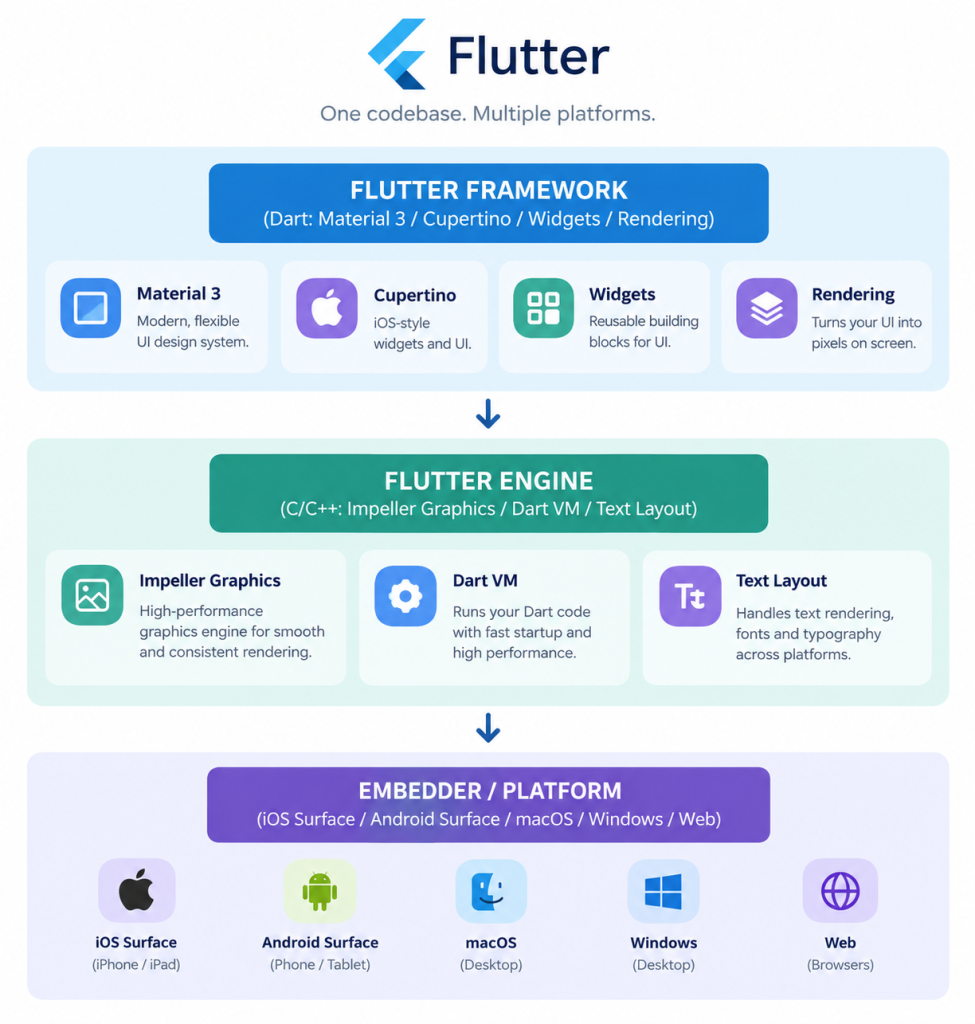
Unlike frameworks that depend on webviews or platform bridges to translate UI calls (like React Native), Flutter draws its entire user interface directly onto a platform canvas using its graphics engine. This approach guarantees visual consistency across all target platforms.
Core Technical Architecture
Understanding how Flutter operates under the hood is critical for making smart architectural decisions.
1. The Rendering Pipeline: Impeller Engine
Flutter uses Impeller, its next-generation rendering engine designed to eliminate runtime shader compilation stutter (jank) on iOS and Android. Impeller pre-compiles shaders during build time, delivering smooth 60 FPS to 120 FPS performance even during complex UI transitions and heavy animations.
2. Everything is a Widget
Flutter treats UI elements as nested widgets arranged in a tree structure:
- Stateless Widgets: Immutable UI elements that depend solely on configuration data (e.g., static labels, icons).
- Stateful Widgets: Dynamic elements that re-render when internal state changes (e.g., input forms, toggles, active lists).
3. Native Compilation via Dart
Dart enables two compilation modes essential for productive development:
- Just-In-Time (JIT): Enables Hot Reload, injecting code changes into the running app in sub-seconds without losing app state.
- Ahead-Of-Time (AOT): Compiles Dart directly into native machine code for production builds, ensuring fast cold-start execution times.
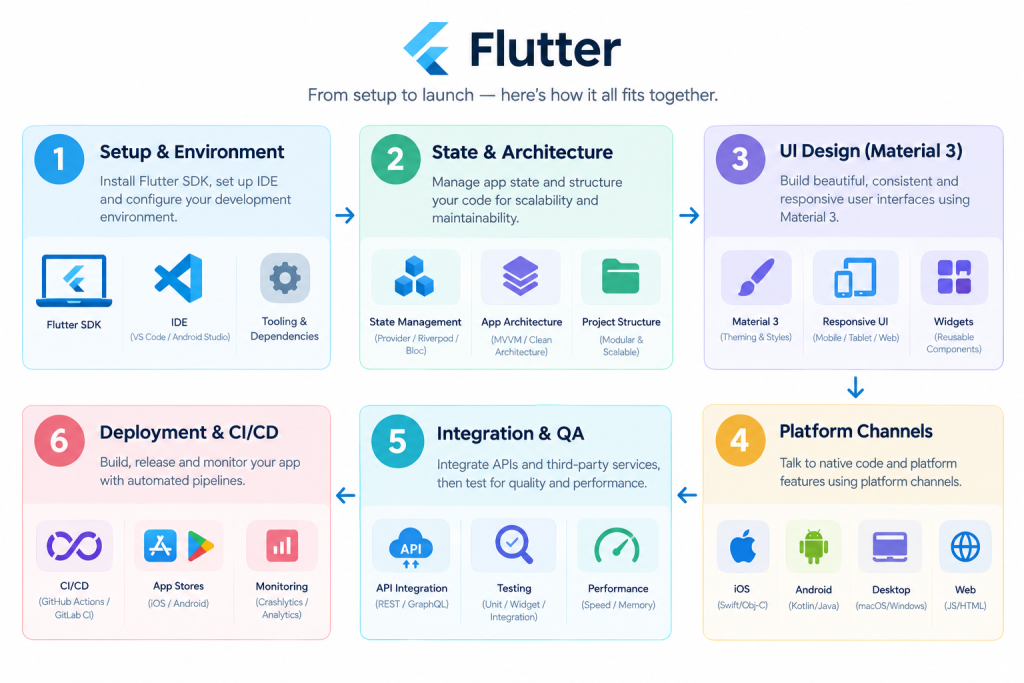
Step-by-Step Flutter Development Process
Step 1: Environment Setup
- Download and configure the Flutter SDK.
- Set up target platform tools (Xcode for iOS/macOS, Android Studio for Android).
- Use flutter doctor via terminal to verify dependencies and license agreements.
Step 2: Architecture & State Management Selection
Choosing the right state management strategy upfront prevents technical debt as your app scales:
- Riverpod: A compile-safe, robust option for modern Flutter applications.
- BLoC (Business Logic Component): The industry standard for enterprise and fintech platforms due to its strict separation of business logic and presentation.
- Provider: Suitable for smaller apps or simpler state requirements.
Step 3: Designing UI with Material 3
Utilize Flutter’s native support for Material 3 (M3) and Cupertino widgets to build responsive, adaptive layouts:
- Use LayoutBuilder and MediaQuery to adjust interfaces across screen sizes.
- Implement dynamic color schemes, dark modes, and fluid micro-interactions.
Step 4: Connecting Native Capabilities via Platform Channels
When accessing hardware-level APIs (biometrics, custom Bluetooth protocols, native payment SDKs), use Platform Channels (MethodChannel) to bridge Dart code with native Swift/Kotlin code seamlessly.
Dart
// Example: Invoking native battery check via MethodChannel
static const platform = MethodChannel(‘com.mindster.app/battery’);
Future<void> getBatteryLevel() async {
try {
final int result = await platform.invokeMethod(‘getBatteryLevel’);
print(‘Battery level: $result%’);
} on PlatformException catch (e) {
print(“Failed to get battery level: ‘${e.message}’.”);
}
}
Step 5: Testing and Quality Assurance
Flutter includes a robust built-in testing framework:
- Unit Tests: Verify individual business logic components and models.
- Widget Tests: Test component UI rendering and interaction in isolation without deploying to a physical device.
- Integration Tests: Execute end-to-end user journeys on physical devices or emulators.
Step 6: CI/CD & Deployment
Automate build pipelines using tools like GitHub Actions, Codemagic, or Fastlane. Combine them with Shorebird for hot-patching critical non-binary production bug fixes directly to user devices without requiring store re-submissions.
Flutter Across Targets: Mobile, Web, and Desktop
| Target Platform | Best Use Cases | Technical Considerations |
|---|---|---|
Mobile (iOS & Android) | Core product delivery, SaaS, e-commerce, banking | Near-native CPU performance, full hardware API access. |
Web | Enterprise dashboards, companion web apps, SaaS portals | Renders using HTML/CanvasKit; best suited for web apps rather than SEO-heavy content sites. |
Desktop (macOS/Win/Linux) | Internal admin tools, data-heavy desktop utilities | Native windowing, keyboard shortcuts, system menu integrations. |
When Should You Choose Flutter?
Flutter is ideal when your team needs:
- Faster Time-to-Market: Single codebase means feature parity across platforms on launch day.
- Cost Efficiency: Reduces maintenance overhead by eliminating parallel iOS and Android codebase updates.
- Consistent Brand Experience: Pixel-perfect control over UI across all operating systems.
Further Reading & Next Steps

Akhila drives the content strategy at Mindster, combining analytical clarity with a passion for digital product innovation. With a deep focus on mobile app strategy and software solutions, she bridges the gap between engineering complexity and intuitive user experiences. She thoughtfully articulates tech concepts, transforming frameworks, case studies, and digital transformation trends into actionable insights for product teams and business leaders.