

Imagine running your online store without opening five dashboards. Instead of exporting sales reports, checking customer behaviour and setting up campaigns by hand, you ask: “How did we perform last month?” “Which customers are buying less often?” “Can you suggest a loyalty campaign to bring them back?” The answer comes with the numbers behind it and a next step you can approve.
That is where AI in e-commerce is heading. The starting point is not a fully automated store. It is an assistant that cuts manual work, makes your business information easy to reach and helps you decide faster. Getting there takes more than adding a chatbot to your store. It takes a setup that gives AI controlled access to your data and actions.
You can use AI to answer business questions, suggest campaigns and set up promotions in minutes, as long as it works from clean, pre-calculated business numbers and cannot change prices or spend money without your approval. Getting there takes three things: a flexible store platform (Medusa is one example), a layer of ready-made business metrics, and clear approval rules.
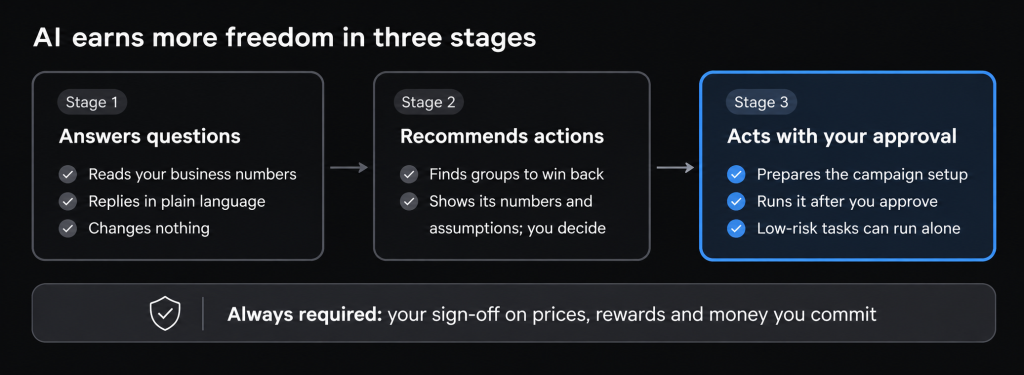
This guide shows how to build it in stages: first AI that answers questions, then AI that recommends actions, then AI that carries out actions you have approved.
1. Where your team’s time goes
Most online stores run on five or six separate tools, and your team spends hours moving between them. A typical set looks like this:
- Store platform: products, customers and orders.
- Accounting or ERP system: stock levels and finances.
- CRM: customer relationships.
- Loyalty program: points and rewards.
- Email and marketing tools: campaigns and customer journeys.
- Analytics tools: reports and performance.
Take a retention campaign. Someone has to export orders, work out who has stopped buying, check loyalty balances, build a customer list and then set up the campaign in the email tool. That is hours of manual work, with a real chance of copy-and-paste errors, and it delays the decision.
Most of that work is repetitive. Only the decisions need your judgement. One AI assistant across these tools takes over the repetitive part.
2. Start with an assistant that answers questions
The first step is to ask your business questions in plain language and get a clear answer. For example:
- What were our top-selling products last month?
- Which products are selling less than before?
- What is our average order value?
- How many customers bought again?
- Which customer groups bring in the most revenue?
You skip the report-building and dashboard-hopping. This stage is also the lowest risk, because the assistant only reads information and changes nothing. It is the right place to start.
3. Why connecting AI straight to your store data is risky
Some vendors let an AI tool query your live store database directly. For a business owner, that creates four risks:
- Exposed data: unrestricted access puts customer and financial records at risk.
- Different answers to the same question: terms like “active customer” or “revenue” need one fixed definition. Without it, the AI may calculate them differently each time.
- Confident but wrong numbers: if the AI misreads your data, you may act on a figure that is incorrect.
- A slower store: heavy queries on the live database can slow down checkout during busy periods.
The safer approach is to give the AI access only to approved, clearly defined business information and actions.
4. Choose a platform that lets you add AI safely
Your store platform decides how easily and safely you can add AI later. Closed platforms limit what you can connect. Open, modular platforms such as Medusa let your developers add custom features, link your other business tools and set exactly what an AI assistant can see and do.
In practical terms, a modular platform gives you:
- Core store features built in: products, customers, orders, pricing and promotions.
- Custom add-ons: a loyalty program, customer groups or special pricing rules built to fit your business.
- Controlled access points: specific actions the AI is allowed to request, and nothing else.
- Automated multi-step tasks: for example, launching a campaign across several tools in one go.
- Triggers: a new order can automatically update your reports or start a customer email.
The result is fewer separate tools to stitch together, and less custom work for every change. It does not remove integration work, but it gives that work a clear structure.
Not Sure Your Platform Can Support AI?
Our product architects review your commerce setup and recommend the right architecture for AI-driven operations.
Discuss Your Requirements5. Prepare your numbers so AI gives reliable answers
AI cannot give useful advice by reading orders one by one. To know which customers are drifting away, it needs purchase history, last purchase date, order frequency and customer lifetime value together.
The fix is to calculate your key business numbers in advance and keep them up to date. The AI then reads these ready-made numbers instead of working through thousands of raw orders each time.
| Group | What to track |
|---|---|
Sales | Daily, weekly and monthly revenue; number of orders; average order value; revenue by product, category, region and sales channel; how much discounts contribute |
Customers | How often they buy; time between purchases; repeat purchase rate; lifetime value; last purchase date; customer group and loyalty tier
|
Products
| Units sold by period; share of revenue; items bought together; slow-moving stock; products that only sell on discount
|
These numbers can refresh on a schedule or update the moment something happens, such as a new order. Larger stores often keep them in a separate reporting database so reports never slow down the store.
The benefit is answers that are faster, consistent from one day to the next and cheaper to produce.
6. From answers to recommendations
Once the assistant has reliable numbers, it can start spotting opportunities. Ask how to improve repeat purchases this month, and it can find:
- Customer groups who are buying less often.
- Customers who have gone past their usual buying cycle.
- Products with strong first sales but few repeat purchases.
- Customer groups that responded well to earlier promotions.
- Loyalty tiers with lower engagement than expected.
It can then suggest a specific action. For example: customers who bought skincare last quarter are reordering less, so a loyalty offer to those who have not bought in 60 days may help. A proposal could look like this:
- Target customers with a qualifying purchase history.
- Leave out customers who bought recently.
- Offer extra loyalty points on selected products.
- Run the offer for two weeks.
- Set a minimum order value.
If you have margin and campaign cost data, the assistant can also estimate whether the promotion pays for itself.
A recommendation is not a guaranteed result. A good assistant states its assumptions and shows the numbers behind its suggestion, so you can judge it and decide.
7. Set up promotions and loyalty campaigns in minutes
Building a loyalty campaign by hand means defining who qualifies, what they earn and how long it runs. An AI-ready store prepares most of that for you.
Take this request: “Create a loyalty campaign for customers who haven’t bought in the last 60 days. Offer double points on selected products for two weeks.”
The assistant works through five steps:
- Retrieve the relevant customer and purchase numbers.
- Segment the customers who match your criteria.
- Validate the campaign against your existing promotions and loyalty rules to catch conflicts.
- Simulate how many customers it will reach and what the rewards could cost.
- Stage the full setup for your approval.
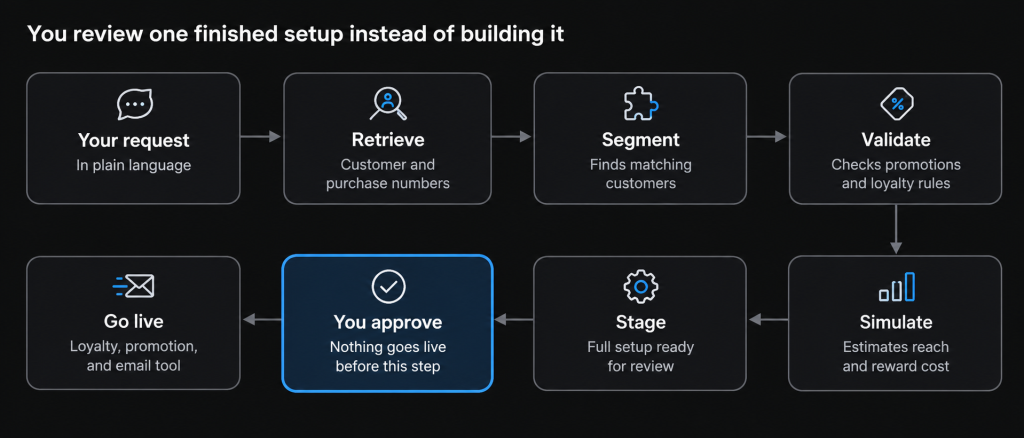
Once you approve, the system sets up the campaign in your loyalty program and turns on the promotion. It can then pass the customer list to an email tool such as Mautic, which sends the messages and manages the customer journey.
Keep two things separate: your store applies discounts at checkout, while your loyalty program tracks points and rewards. The AI coordinates both without changing how either one works.
Your role changes from building the campaign to reviewing and approving it.
8. Decide what AI can do on its own
Give AI more responsibility step by step. First it retrieves information, then it recommends, then it prepares setups, and finally it carries out what you have approved. Later, low-risk repetitive tasks can run on their own within rules you set.
| Task | What AI does | Your control |
|---|---|---|
Sales reporting
| Retrieves and summarises daily numbers
| Fully automated
|
Customer analysis
| Identifies customer groups by engagement
| Fully automated
|
Campaign planning
| Suggests promotions
| You approve
|
Loyalty setup
| Prepares campaign rules
| You approve
|
Promotion launch
| Runs the approved campaign
| After your approval
|
Email journeys
| Triggers approved messages
| After your approval
|
Product updates
| Prepares changes for review
| You approve
|
Pricing changes
| Suggests adjustments based on how fast items sell
| Your explicit sign-off
|
Not everything needs your sign-off. But anything that affects prices, customer rewards, money you commit or core business rules should always have an approval step. Back this with permissions, written business rules, spending limits and a record of every action the AI takes.
The goal is not to take people out of the business. It is to cut the time they spend on repetitive coordination while you keep control of the decisions that protect your margin and your customers.
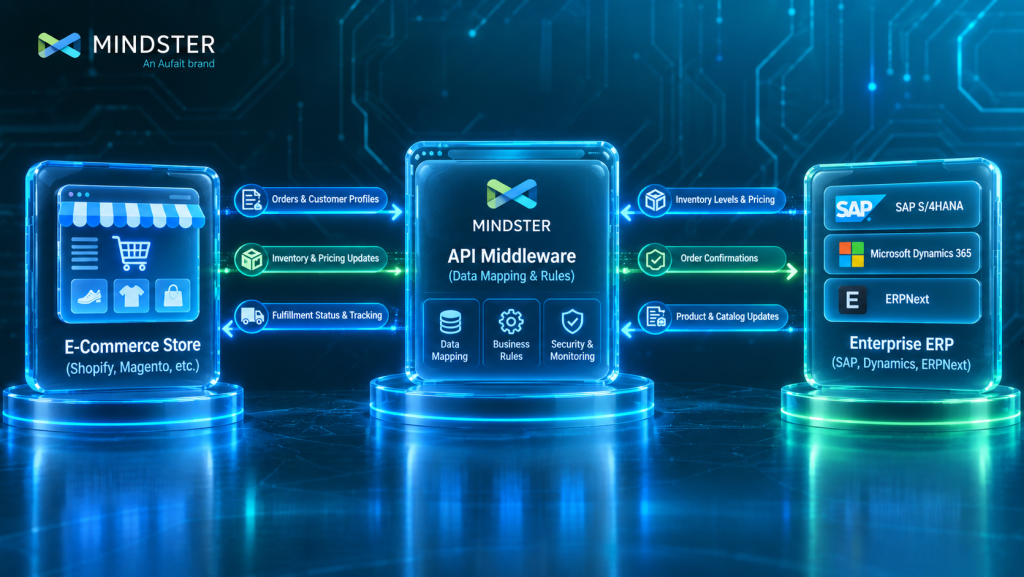
9. Connect the tools around your store
An assistant that only sees orders can report on sales. It cannot tell you whether a promotion will be profitable or whether you have the stock to support it. Useful advice needs information from across the business:
- Your store platform: orders and customer activity.
- Your loyalty program: points, tiers and rewards.
- Your accounting or ERP system: costs, finances and stock.
- Your email tool (such as Mautic): customer communication.
- Your reporting layer: history and trends.
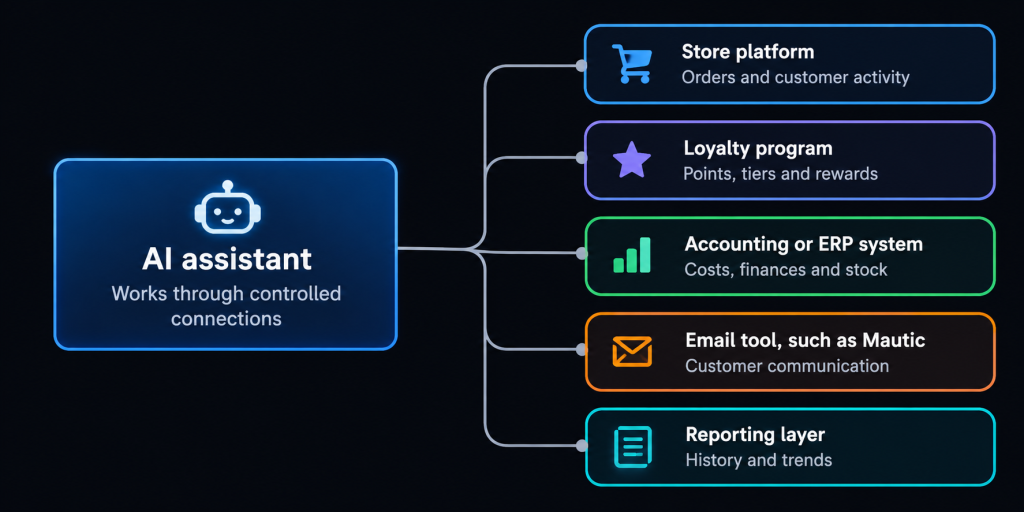
With a modular platform, the AI can pull from all of these and act through controlled connections. The aim is not another standalone AI product. It is to make the tools you already pay for easier to use together.
Where Mindster fits
Mindster builds loyalty platforms, AI/ML solutions and cloud-native integrations for commerce and fintech businesses. In these projects, the AI model is the smaller part of the work. Most of the effort goes into the foundations above: clean connections between your tools, consistent business numbers, and approval steps that match how your business already makes decisions.
Conclusion
The near-term opportunity for AI in e-commerce is less manual work, not a fully automated store. You already have the data, tools and processes. What is missing is an efficient way to bring them together, understand them and act on them.
Start with an assistant that answers questions from reliable numbers. Add recommendations, then approved actions, and give it more freedom only where the risk is low.
Ready to Make Your Online Store AI-Ready?
Connect your store, loyalty program and ERP to an AI assistant that needs your approval.
Talk to Our AI Experts
Ashik C K is a Senior Software Engineer with 14 years of experience in software development and engineering. With a strong technical background, he focuses on building reliable, scalable, and efficient software solutions. He brings extensive industry experience and technical expertise to delivering innovative digital solutions that address business needs.