
Key Takeaways
- E-commerce ERP integration establishes automated data synchronization between your online store (e.g., Shopify, Magento, WooCommerce) and enterprise platforms like SAP, Microsoft Dynamics 365, or ERPNext.
- Eliminates manual data entry, prevents stockouts and overselling, reduces order fulfillment delays, and corrects financial reporting mismatches.
- Automated order processing, real-time inventory visibility across channels, accurate financial reconciliation, and faster delivery timelines.
- Data mapping complexity, integration architecture (middleware vs. custom APIs), legacy system constraints, operational downtime during rollout, and ongoing maintenance.
- Critical for growing businesses processing high daily order volumes, managing multi-location inventory, or expanding B2B and B2C sales channels.
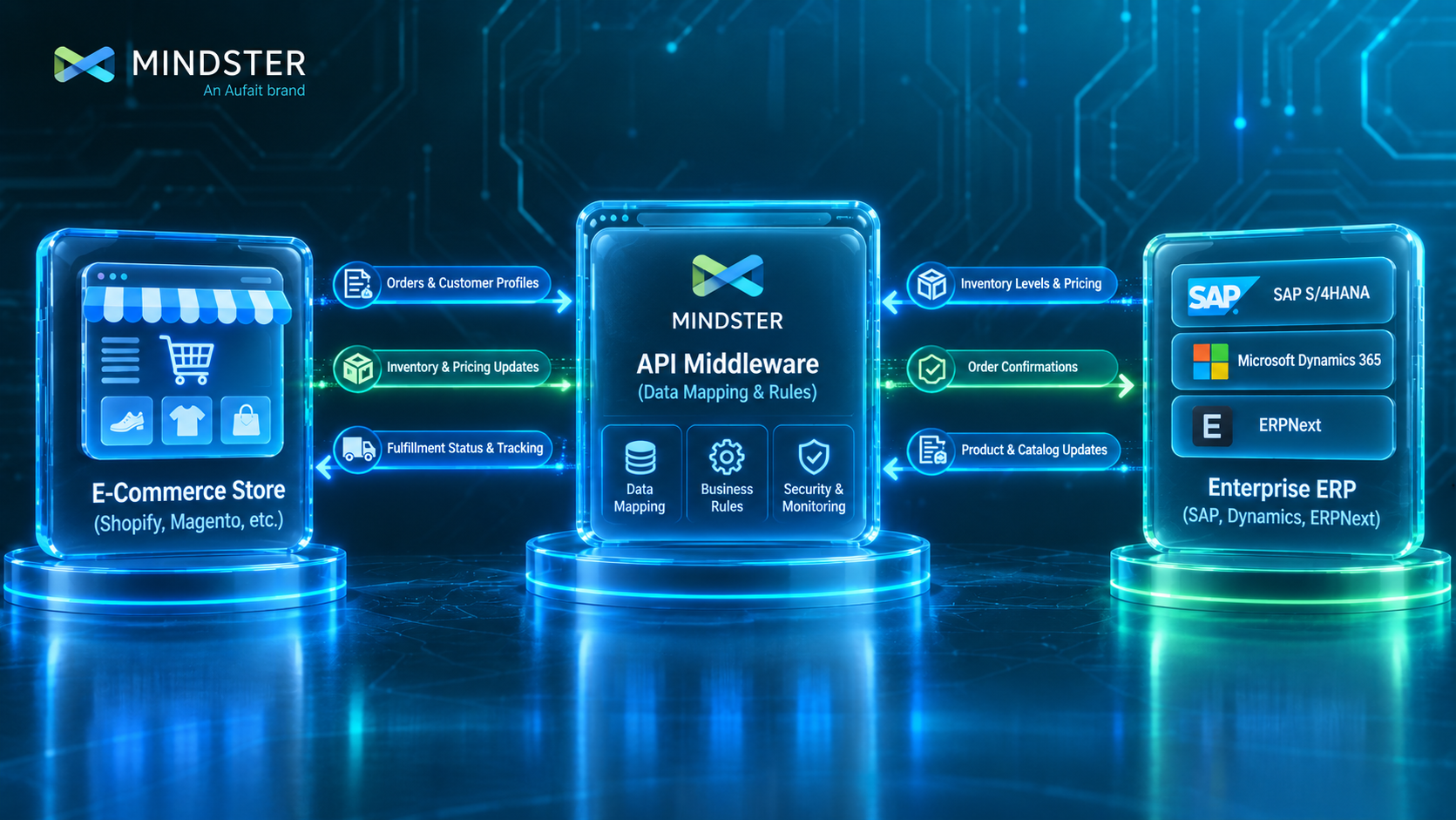
- Mindster plans, builds, and maintains custom middleware and API integrations connecting modern e-commerce architectures to enterprise ERPs tailored to specific business workflows.
Managing an online store while operating on disconnected systems creates operational bottlenecks. When a customer places an order online, that transaction details must reach your inventory, fulfillment, and accounting departments.
If employees spend hours daily manually copying order details from an e-commerce platform into an enterprise resource planning (ERP) system like SAP, Microsoft Dynamics 365, or ERPNext, operations slow down and errors multiply.
Orders get delayed, stock levels become inaccurate across sales channels, and customer support struggles to track shipment statuses.
Connecting your e-commerce platform directly to your ERP system replaces manual data transfers with automated background synchronisation.
This guide explains how ERP integration works, the operational problems it solves, key architectural choices, and what decision-makers must evaluate before starting an integration project.
What Is E-commerce ERP Integration?
E-commerce ERP integration is the technical bridge that connects an online storefront (such as Shopify Plus, Adobe Commerce/Magento, WooCommerce, or BigCommerce) to an enterprise back-office management system (such as SAP S/4HANA, Microsoft Dynamics 365, or ERPNext).
As online retail evolves alongside broader mobile commerce trends, keeping these core platforms synchronized becomes vital for growth.
Instead of maintaining isolated databases, an integrated system passes data bi-directionally between the systems in real time or via scheduled batch updates.
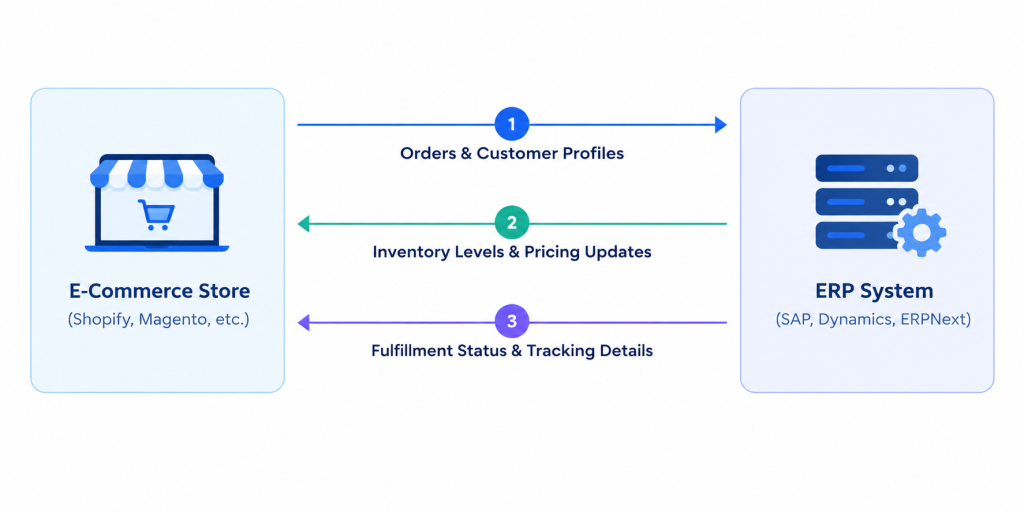
When functioning properly, this connection automates key data flows:
- Orders: Customer purchases pass directly to the ERP for processing, invoicing, and fulfillment.
- Inventory: Physical stock changes recorded in the ERP automatically update inventory levels on the website.
- Pricing & Products: Master product data, price lists, and promotions configured in the ERP push to the storefront.
- Fulfillment: Shipping details and tracking numbers generated in the ERP update the customer’s order status online automatically.
What Business Problems Does ERP Integration Solve?
Operating an e-commerce business without an integrated ERP leads to specific operational and financial bottlenecks:
1. Manual Data Entry Errors and Operational Delay
Manually re-entering customer information, shipping addresses, and line-item details from online orders into an ERP system takes time and invites human error. Simple typos in address fields cause delivery failures, while incorrect stock adjustments disrupt order processing timelines.
2. Overselling and Stockouts
When inventory levels do not sync automatically, your store risks selling items that are out of stock in the warehouse. Alternatively, safety stock buffer limits are set too high, tying up working capital in unsold products. Real-time stock visibility ensures that displayed quantities accurately reflect physical inventory.
3. Customer Service Inquiries About Order Status
When order fulfillment happens in the ERP without pushing data back to the storefront, customers receive late or missing tracking details. This increases the load on customer support teams handling routine status updates.
4. Delayed Financial Reconciliation
Finance teams struggle to balance daily receipts, processor fees, taxes, and refunds when payment data lives isolated within the e-commerce store. Implementing structured ecommerce payment solutions alongside automated ERP sync pushes daily settlement data straight to the general ledger, streamlining financial closing
5. Inability to Scale B2B Operations
B2B e-commerce requires complex workflows, including buyer-specific price tiers, credit limit checks, payment terms, and custom catalogues. Running these rules manually across different systems becomes unmanageable as client order volumes grow.
How much can ERP integration cut operational costs?
Automation removes manual data entry, cutting order processing costs and fulfillment errors significantly.
Calculate Your SavingsHow E-commerce ERP Integration Works
ERP integration relies on secure web connections (APIs), automated triggers (webhooks), or direct database connectors to move data between platforms.
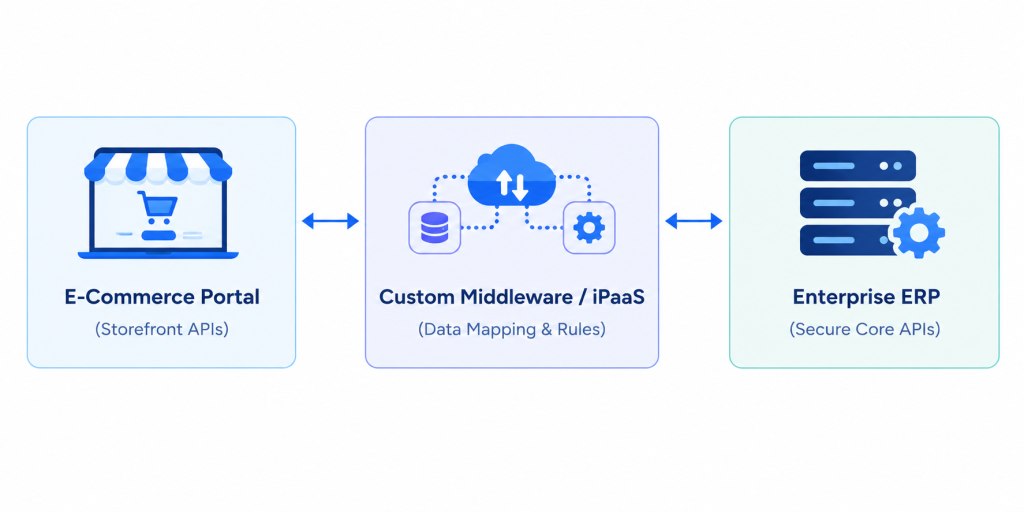
Here is a step-by-step view of how an integrated order flow works in practice:
- Order Capture: A customer places an order on your storefront. The e-commerce system issues an automated notification containing order lines, customer records, and payment confirmations.
- Data Transformation: Middleware or custom integration software receives the raw transaction details. It translates the online order format into the structured records required by your ERP.
- Validation and Rules Engine: The integration layer verifies customer data, applies tax codes, checks credit limits, or assigns appropriate warehouse routing rules defined by your business logic.
- ERP Record Creation: The validated data posts to the ERP, generating a sales order, reserving stock, and issuing a picking list to the warehouse.
- Status & Inventory Sync: Once the warehouse packs and ships the item, the ERP creates a fulfillment record with tracking info. The integration layer catches this update, pushes the tracking code to the e-commerce platform, triggers customer shipment emails, and adjusts stock balances across all sales channels.
Core System Integrations: SAP, Dynamics 365, and ERPNext
Every enterprise ERP platform uses specific architectures and integration standards. Understanding these nuances ensures a smoother integration strategy.
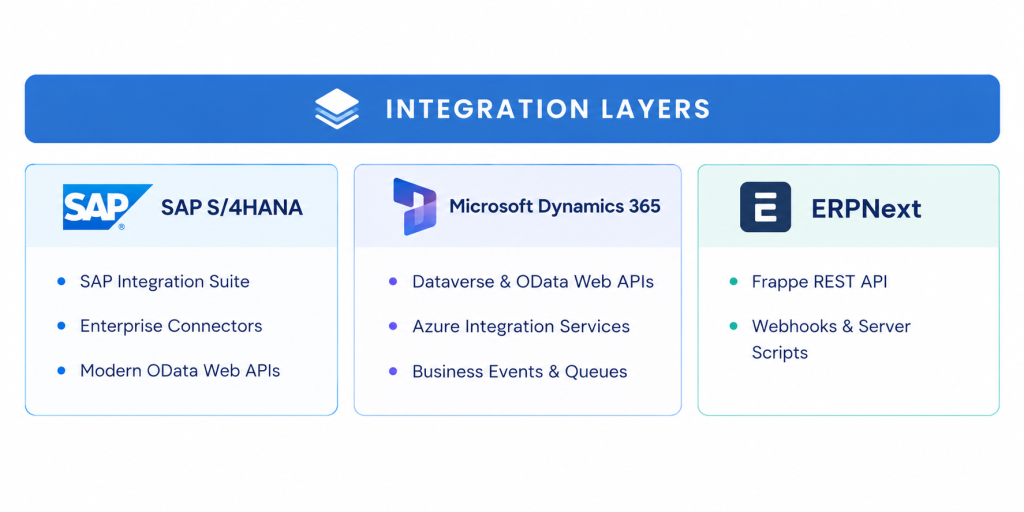
SAP (SAP S/4HANA / SAP Business One)
- Integration Mechanisms: SAP Integration Suite, standard OData web services, enterprise connectors, and core data interfaces.
- Key Focus: SAP installations often involve heavily customized business logic and strict data validation rules. Integration projects must account for complex enterprise pricing rules, hierarchical customer structures, and specialized unit-of-measure conversions.
Microsoft Dynamics 365 (Finance & Operations / Business Central)
- Integration Mechanisms: Azure Integration Services, Dataverse APIs, real-time Business Events, and standardized web endpoints.
- Key Focus: Microsoft’s ecosystem supports asynchronous communication via cloud messaging queues. This architecture prevents web checkouts from slowing down if the ERP experiences high system loads during peak hours.
ERPNext
- Integration Mechanisms: Frappe REST API endpoints, built-in webhook triggers, custom server scripts, and DocType data structures.
- Key Focus: ERPNext is an open-source, highly adaptable ERP platform. Its REST API and event-driven architecture allow straightforward integration, but custom DocTypes and unique workflow states require precise data mapping to align seamlessly with storefront schemas.
Key Features to Look For in an Integration Solution
When evaluating integration software or custom architecture, look beyond basic data transfer. Essential operational features include:
| Integration Feature | Business Purpose | Practical Impact |
|---|---|---|
Bi-Directional Sync
| Maintains matching records across storefronts and back-office databases. | Prevents conflicting stock status and updates order progress automatically in both directions. |
Data Mapping & Transformation Engine | Translates field structures, taxonomy, tax formats, and currency rules between platforms. | Eliminates data loss and avoids forcing structural changes on your main ERP or website.
|
Queue Management & Retry Mechanisms | Holds transaction records securely during network drops or scheduled ERP maintenance. | Prevents missed orders or lost data when target platforms go temporarily offline. |
Error Handling & Audit Logs | Captures processing exceptions (e.g., missing address details, invalid SKUs) and alerts staff. | Helps operational teams locate and resolve failing records quickly without developer help. |
Field-Level Scheduling Controls | Configures near-real-time triggers for orders alongside batch updates for inventory syncs. | Protects system bandwidth and limits unnecessary API usage costs. |
Measurable Benefits of E-commerce ERP Integration
Investing in an integrated architecture delivers clear business outcomes:
- Lower Operational Costs: Automating data transfer reduces manual administrative labor, freeing back-office teams to focus on customer support and fulfillment tasks.
- Faster Order Fulfillment: Automated order ingestion pushes orders directly to warehouse picking queues within minutes, helping businesses meet tight delivery windows.
- Higher Order Accuracy: Direct data pipelines reduce mispicks, invalid delivery addresses, and billing errors caused by manual entry.
- Unified Multi-Channel Inventory: Synchronized stock management prevents overselling across direct-to-consumer websites, wholesale portals, and third-party marketplaces.
- Improved Financial Reporting: Automated journal entries match daily sales, sales taxes, shipping fees, and gateway charges directly inside your accounting software.
Practical Implementation Considerations
A successful integration project requires careful planning around key business factors before writing code:
Data Governance and Cleansing
Integrating systems exposes underlying data quality issues. If product SKUs, customer IDs, or unit-of-measure mappings are inconsistent between your online store and ERP, automated syncs will fail. Cleanse master data records and standardize naming formats beforehand.
Security & PCI Compliance
Passing data between e-commerce storefronts and ERP backend databases requires strict encryption. Applying robust e-commerce app security tips ensures customer PII and payment tokens are handled safely without exposing internal databases.
System Scalability & Platform Nuances
Growing businesses evaluating high-volume platforms must review architectural differences, such as evaluating Shopify Plus vs Standard Shopify, to ensure API throughput matches backend ERP capabilities. Additionally, leveraging low-code development platforms for B2B can accelerate workflow design where applicable.
Infrastructure Alignment & Error Handling
ERPs require periodic maintenance windows and patches. Aligning your integration setup with established DevOps and product engineering integration practices ensures transactions queue securely during ERP maintenance and replay automatically once systems return online.
Build vs. Buy vs. Customize: Choosing the Right Approach
Businesses generally choose between three core architecture options for ERP integration:
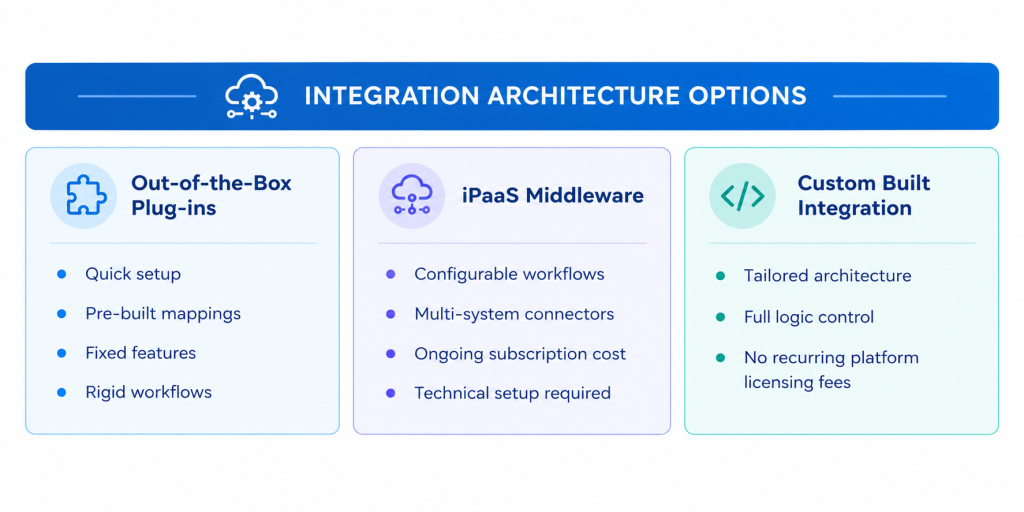
1. Out-of-the-Box Connectors / Plugins
- Best For: Small businesses running standard, uncustomized storefronts and basic ERP installations.
- Pros: Fast implementation; lower upfront initial cost.
- Cons: Rigid workflows; breaks easily if custom fields or unique business rules exist.
2. Integration Platform as a Service (iPaaS)
- Best For: Mid-market to enterprise companies with standard ERP workflows wanting pre-packaged platform monitoring tools.
- Pros: Scalable cloud platforms; built-in error monitoring and connection adaptors.
- Cons: High recurring subscription fees; still requires developer setup for complex customizations.
3. Custom API & Middleware Development
- Best For: Enterprises needing tailored full stack development services for heavily customized ERP environments, specialized B2B pricing, or multi-warehouse fulfillment setups.
- Pros: Total control over data mappings, custom logic, performance optimization, and message queues. Avoids ongoing platform subscription overheads.
- Cons: Requires higher upfront planning, development effort, and experienced implementation partners.
Should you build custom middleware or use iPaaS?
Custom middleware suits complex B2B workflows without recurring platform licensing fees.
Explore Integration ArchitectureHow Mindster Can Help
Mindster provides end-to-end custom software development and software product engineering services. For e-commerce businesses scaling past standard off-the-shelf software, Mindster builds tailored integration pipelines and middleware to connect modern storefronts directly to SAP, Microsoft Dynamics 365, ERPNext, and other core platforms.
Engineering Integration Solutions for Specific Requirements
- Custom Middleware Architecture: Building robust integration layers using modern cloud architectures to process high-volume transactions safely.
- Complex Data Mapping: Mapping non-standard custom fields, variant pricing, B2B account hierarchies, and multi-currency tax configurations between store platforms and ERPs.
- Reliable Queue Management: Implementing asynchronous event queues to ensure data is held safely during target platform downtime.
- Performance & Store Optimization: Aligning database syncs with online store performance optimization, so background syncs never impact storefront page speeds.
Mindster works closely with your internal technology and operations teams to review your business workflows, design clear data mapping, build secure API pipelines, and test edge cases thoroughly before rollout.
Practical Example: Scaling Multi-Store Operations
Consider a growing omnichannel merchant managing three separate brand storefronts alongside a wholesale B2B channel.
- Without Integration: Operations staff must log into three distinct e-commerce admin panels daily, export spreadsheet files of orders, reformat them manually, and upload them into their ERP. Stock updates are exported from the ERP and manually re-uploaded to each storefront once a day. Peak sales events routinely cause stock errors and fulfillment backlogs.
- With Integrated Architecture: A centralized middleware solution captures orders from all three consumer storefronts and the B2B portal in real time, translating them into mapped transactions within a single ERP. Stock deductions update across all four channels immediately. Order tracking numbers generated at the warehouse pass back to the matching storefront automatically, keeping customers informed without manual intervention.
Plan Your ERP Integration Strategy
Connecting your online store to an enterprise ERP system eliminates manual administrative tasks, lowers fulfillment error rates, and ensures accurate inventory visibility across all sales channels. Successful integration depends on clear business logic planning, reliable error handling, and robust system architecture.
If you are evaluating how to connect your e-commerce storefront to SAP, Microsoft Dynamics 365, ERPNext, or a custom ERP, contact Mindster to discuss your architecture, review data requirements, and engineer a reliable integration strategy for your business.
How long does custom ERP integration take?
Most enterprise integrations take 8 to 16 weeks from scoping to final production deployment.
Request Integration Timeline
Ahamed Sajid is a technology delivery leader focused on building scalable systems that bridge business strategy and execution. With experience across fintech, mobility, e-commerce and enterprise platforms, he specializes in designing structured approaches to complex problem-solving and product delivery. He is particularly interested in how well-defined systems, processes, and technology frameworks can drive sustainable growth and operational clarity. Through his work, Ahamed advocates for pragmatic innovation where ideas are shaped into reliable, high-impact solutions that deliver real-world value.