
A long queue at the billing counter costs you sales you never see. A stack of invoices and purchase orders on the accounts desk costs you time and accuracy you do notice, but often too late. Both come from the same cause: billing, buying and accounts that run as separate, manual steps.
This guide explains how queue-free mobile checkout works, what invoice and purchase order (PO) automation actually replaces, how ERP ties it together, and how to roll it out without disrupting sales. It draws on how we at Mindster build these systems for retail chains.
At a glance
- Mobile checkout lets staff or customers bill from a phone, so the queue forms around people, not around a counter.
- Invoice automation removes re-typing: a bill created at the counter flows straight into stock and accounts.
- PO automation creates purchase orders from live stock levels, using rules you set.
- 3-way matching checks every supplier invoice against the PO and the goods you received before you pay.
- ERP is the system that connects all of these in one flow. You do not have to replace your existing systems to start.
- Roll out in phases: checkout first, then purchase orders, then the wider ERP connection.
Why billing counters and back-office paperwork slow retailers down
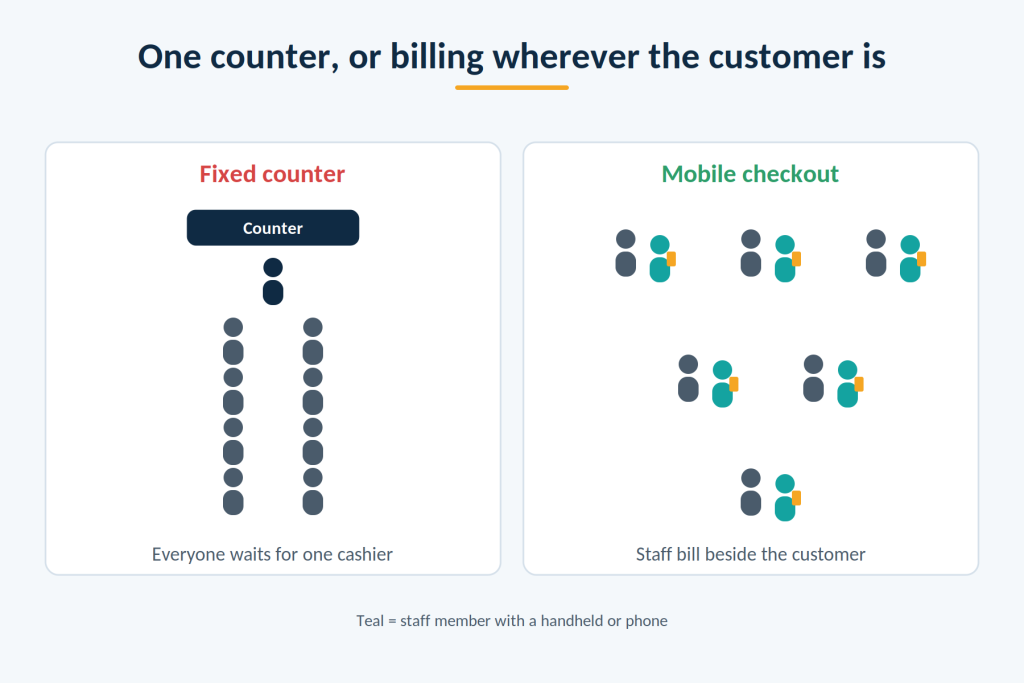
At the counter, every customer waits for the one before them. At peak hours, such as weekends, festivals and salary days, the line grows faster than one counter can clear it. Some customers wait, and some leave without buying.
Behind the counter, the paperwork piles up. Invoices are printed, carried between desks, typed into the accounts system and filed. Purchase orders are written up by hand or in spreadsheets, sent by phone or email, and then matched by eye against supplier invoices weeks later. Each step is a chance for a typing error, a lost slip or a duplicate payment.
A quick check of your billing process
You can measure the problem in a day, without any software:
- At peak hour, time 20 customers from joining the queue to leaving the counter. Note the longest wait.
- Ask your accounts team how many invoices are typed in again by hand each day, and how long that takes.
- Count the days your team needs at month-end to close the books.
- Count the supplier invoices in the last quarter that had a wrong price, wrong quantity or were paid twice.
If waits are long, re-typing is routine and month-end takes more than a few days, automation will pay back.
How queue-free mobile checkout works
Mobile checkout means billing is done on a phone, tablet or handheld device instead of only at a fixed counter. There are four common ways to do it.
- Staff handheld billing. A salesperson walks up to the customer, scans the items on a handheld or phone, takes payment and sends the invoice. The customer never joins a line.
- Scan and go. Customers scan items with their own phone as they shop, pay in the app and show a digital receipt at the exit.
- App-based self-checkout. The customer scans and pays at a self-service point, or in the store’s app, without waiting for a cashier.
- QR and UPI payment. The customer pays by scanning a QR code or using UPI. This can be combined with any of the options above, and it removes the delay of cash handling.
In all four, the customer gets the invoice on their phone through WhatsApp, SMS or email, and the sale is recorded in the system straight away.
Which option suits which type of store
| Store type | Usually the best fit |
|---|---|
Apparel and footwear | Staff handheld billing, so staff can bill in the trial room or at the shelf |
Grocery and supermarkets | Scan and go or self-checkout, since baskets are large and fast-moving |
Electronics and appliances | Staff handheld billing, because items are high value and need serial numbers and warranty details |
Jewellery and other high-value items | Staff-assisted billing with digital signature, so the customer is never left alone |
Many stores use a mix: handhelds for assisted shopping and a few self-checkout points for quick purchases.
Grocery chains that also sell online can pair in-store checkout with a delivery app for customers, store staff and delivery teams. See Mindster’s grocery delivery app solutions.
What hardware you need
Less than most owners expect. Staff phones or low-cost tablets with a scanner app can work. Busier stores add handheld scanners, a small portable receipt printer for customers who want paper, and a card or UPI payment device. Start with a few devices at the busiest hours and add more as you see the results.
What happens when the internet drops
A reliable mobile checkout keeps billing during an outage. The device saves the sale locally, and sends it to the central system when the connection returns. Ask any vendor to show this. If billing stops when the internet stops, the system is not ready for a busy store.
Discounts, loyalty, returns and exchanges
The system should apply the same price rules, offers and loyalty points as your counter does. Returns and exchanges should also be possible from the mobile device, with the original invoice looked up by phone number or bill number. If they are not, staff go back to the counter and the queue returns.
Preventing theft and scanning errors
Self-checkout works best when it has light, simple controls:
- A staff member checks the basket at the exit, or checks a random sample of baskets.
- High-value items are billed by staff, not by customers.
- Every item scanned is matched with the stock record, so differences show up in your daily counts.
- Staff can see, in real time, any bill that was changed or cancelled.
GST and e-invoices
Every invoice from a mobile device should carry the same GST details as one from the counter, with the right tax by item and by state. Where e-invoicing is required for your business, the system should generate it automatically. Ask the vendor to show a sample GST invoice and, if relevant, an e-invoice before you decide.
Getting customers to use it
Most customers accept the change if it is faster and they are not forced into it. Offer the option, put a staff member near the new points for the first few weeks, and send the invoice by WhatsApp so the customer sees the benefit at once. Keep the old counter open for customers who prefer it.
What invoice automation replaces
Invoice automation means that once a bill is created, nobody types it again. In a manual setup, the same sale is entered three times: at the counter, in the stock register and in accounts. Automation reduces that to one entry.
It replaces:
- Re-typing sales invoices into the accounting system. The sale posts to accounts, GST and stock on its own.
- Printing and carrying paper bills between the counter, packing and accounts. The invoice travels as a digital record.
- Typing supplier invoices. The software reads the invoice from an email, spreadsheet or scanned PDF and pulls out the supplier, items, quantities, prices and tax. Newer tools do this without needing a fixed template for each supplier.
- Hunting for old invoices. Every invoice is stored in one place and can be found by number, date or customer.
The result is fewer typing errors, a shorter month-end close and a clear record for audits. Staff who spent hours on data entry can spend that time on checking exceptions and following up with suppliers.
Tired of queues at the counter and re-typing at the back office?
Tell us how your stores bill today. We’ll show where mobile checkout and invoice automation fit, without replacing your current systems.
Talk to our teamHow purchase order automation works
Purchase order automation creates orders to suppliers from your actual stock, instead of from memory or a spreadsheet.
- Each product has a minimum stock level for each store and the warehouse. This is your reorder level.
- When live stock falls to that level, the system drafts a purchase order for the usual supplier and a sensible quantity.
- The order goes for approval, if your rules need it. For example, orders under a set value are approved automatically, and larger ones go to a manager.
- The approved order is sent to the supplier by email or through a supplier link, and the system tracks when delivery is due.
This depends on accurate stock numbers across all your locations. If you run more than one store, a shared live stock record comes first. Our guide to real-time inventory sync for multi-location retail chains covers that step.
Good purchase order automation stops two problems at once. It prevents stockouts, because orders are raised on time. It also prevents over-ordering, because quantities are based on sales and not on guesses. You can also set approval limits by supplier or by value, so nothing unusual goes out unchecked.
3-way matching in simple terms
3-way matching is the check you make before paying a supplier. It compares three documents:
- The purchase order, which says what you asked for and at what price.
- The goods receipt, which says what actually arrived at your store or warehouse.
- The supplier invoice, which says what the supplier is charging you for.
If all three agree on item, quantity and price, the invoice is approved for payment. If not, it is held.
Here is an example. You order 100 units at ₹200 each, so the PO is ₹20,000. Only 90 units arrive. The supplier invoices you for 100 units, ₹20,000. The match fails on quantity. You pay for 90 units, ₹18,000, or ask for a corrected invoice or a credit note. Without matching, the ₹2,000 difference is easy to miss.
Matching also catches wrong prices, extra items you never ordered, and the same invoice submitted twice. This protects you from both honest mistakes and fraud.
With automation, most invoices match on their own and go straight through. The system flags only the ones that do not, and a person decides what to do. Typical reasons for review are a small price difference, a partial delivery, or a tax mismatch.
Where ERP fits
An ERP (enterprise resource planning) system is software that keeps billing, stock, purchasing and accounts in one place, so they all use the same data. When the counter sells an item, stock falls. When stock falls to the reorder level, a PO is raised. When goods arrive and the supplier invoice is matched, accounts are updated. Nobody re-types anything.
ERP, billing software and accounting software
- Billing (POS) software records sales at the counter.
- Accounting software records money in and out, such as in Tally or Zoho Books.
- ERP connects these and adds stock, purchasing and often staff and supplier management.
Many retailers already have one or two of these. The usual goal is not to replace them, but to connect them.
Do small retailers need an ERP?
Not always. A chain with two or three stores and simple buying may be well served by a good billing system connected to accounting. ERP becomes worth it when you have many stores, a warehouse, many suppliers, or a team spending a lot of time moving data between systems.
Cloud or on-premise ERP
Cloud ERP runs on the vendor’s secure servers, and every store reaches the same data through a browser or app. It is the usual choice for chains. On-premise ERP runs on your own servers, which gives more control but leaves backups, repairs and store connections to you.
Common ERP options for retailers
Retail chains usually run on one of a few well-known systems:
- SAP and Oracle: large, full-featured systems used by big enterprises. They are powerful, but heavier and costlier to set up.
- Microsoft Dynamics 365: a cloud ERP from Microsoft, used by many large retail groups.
- ERPNext: an open-source ERP, which means the software itself is free to download and you pay for hosting, setup and support. It covers billing, stock, buying and accounts, and is often chosen by small and mid-sized businesses. It can be customised, and it shares data with other apps through standard connections, so a mobile checkout app can read stock and write invoices and purchase orders into it.
The brand matters less than the test: can a sale reach stock, purchase orders and accounts without anyone re-typing it? Whichever ERP you run, mobile checkout and invoice automation should connect to it, not replace it.
How to choose an ERP
Ask these questions in every demo:
- Show me a sale at a store reaching stock and accounts without anyone re-typing it.
- Show me a PO created from a low-stock alert, approved and sent.
- Show me 3-way matching, including what happens when the quantity is short.
- Can it handle several stores, a warehouse and franchise stores?
- Which of my current tools does it connect to, and which need custom work?
- What costs extra: users, stores, support, training, data import?
Watch for vendors who cannot show the full flow from sale to accounts, who require you to replace everything at once, or who cannot name a retail customer of your size.
How Mindster helps retailers automate billing, invoices and purchasing
Mindster has built mobile apps, web platforms and custom software since 2009, with more than 500 applications delivered. For retailers, our work focuses on connecting the store floor to the ERP, so staff and customers move faster and the back office stops re-typing.
Our approach has four parts:
- Connect to your ERP, do not replace it. We build a middleware layer that reads from and writes to the ERP you already run, so your core financial system stays untouched. Our invoice and PO software integrates with SAP, Oracle and Microsoft Dynamics 365.
- Put staff and customers on phones. We build mobile apps for staff, such as scanning, billing, signatures and packing, and customer-facing alerts over WhatsApp and SMS.
- Automate the paperwork. Our AI-based invoice and PO software reads purchase orders and invoices from email, spreadsheets and scanned PDFs, without a fixed template for each supplier. It runs automated 3-way matching and sends the approved data to the ERP.
- Keep people in control. When the software is unsure of a figure or finds a mismatch, it sends the item to a review screen for a person to decide. Every match, adjustment and ERP entry is logged for audits.
When custom software makes sense
A ready-made billing or ERP product is enough for many retailers. Custom work is worth considering when your store flow is unusual, when ready-made tools do not connect to your ERP, when you want your own branded customer app, or when you want to own the system and shape it as you grow. If a ready-made tool fits, we will say so.
How Mindster has done this for a global jewellery retailer
The same approach works for any multi-store retailer, whether it sells clothes, groceries, electronics or jewellery. Jewellery is where Mindster has delivered these projects.
A leading international jewellery retailer, with more than 350 outlets across 13 countries, worked with Mindster on two projects that relate to this guide.
Invoicing from billing to packing. Paper invoices were carried between the sales counter, billing and packing, which slowed every sale, especially during festival rushes. Mindster linked the ERP to staff mobile apps, digital tokens and WhatsApp updates, so each invoice moves digitally. Mindster reports 80% less manual work at the store and a fully paperless workflow. Read the invoicing case study.
Purchasing and replenishment. Refill orders for store packaging supplies across more than 50 stores were drafted by hand and often placed too late. Mindster built a mobile app and refill system connected to the ERP that works out each branch’s needs from live stock and drafts purchase orders in scheduled batches. Mindster reports 70% less admin work on refill orders and no seasonal stockouts. Read the replenishment case study.
In both projects, the new system connected to the ERP the company already used instead of replacing it.
What jewellery retail adds
Jewellery shows how far this can go. A single invoice carries more detail than a normal retail bill: item weight, purity, making charges, hallmark details where required and old-gold exchange. Values are high, so a signature and a complete audit trail matter. If you run a jewellery business, see Mindster’s work for jewellery retailers.
Cost, time and rollout
What it costs. Most vendors charge a monthly fee per store or user, plus a one-time setup fee. Add the cost of devices such as phones, handheld scanners, printers and payment machines, and the cost of connecting to your ERP and accounting tools. Ask what is included, and what is billed extra.
How long it takes. Mobile checkout in a few stores can be live in a few weeks. PO automation and ERP connection take longer, since they depend on clean product and supplier data. Plan for several months for a full rollout across a chain.
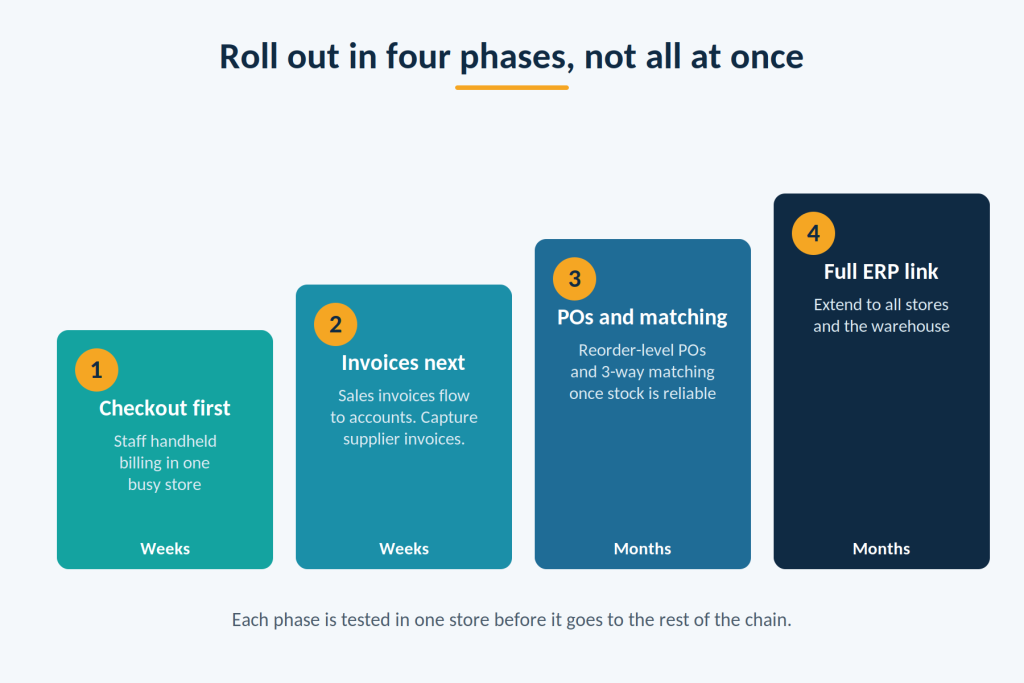
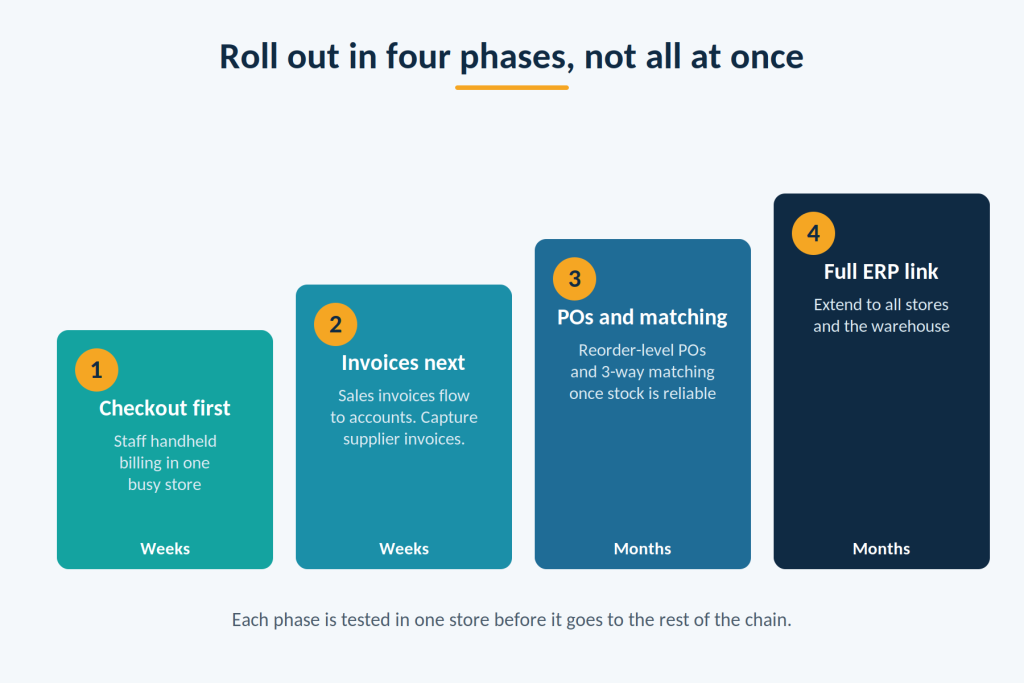
Rolling out in phases
- Checkout first. Start with staff handheld billing in one busy store. You see results quickly, and staff learn on a small scale.
- Invoices next. Connect billing to accounts so sales invoices flow through without re-typing, and start capturing supplier invoices automatically.
- Purchase orders and matching. Turn on reorder-level POs and 3-way matching once your stock numbers are reliable.
- Connect to the ERP fully. Extend the flow to all stores and the warehouse.
Working out whether it pays for itself
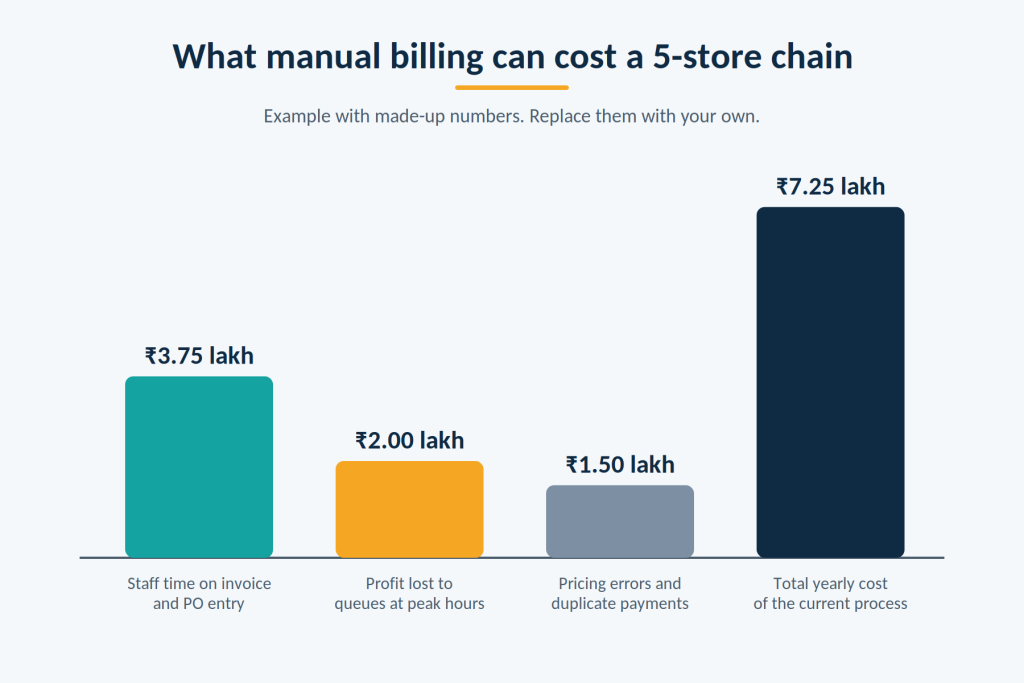
Add up what the current process costs you each year, then compare it with the yearly cost of the system. Here is an example with made-up numbers for a chain of 5 stores:
- Accounts staff spend about 10 hours a day typing invoices and POs. If automation cuts that in half, you recover 5 hours a day, or about 1,500 hours a year. At ₹250 an hour, that is ₹3.75 lakh.
- Queues at peak hours cost you about 1% of ₹8 crore in sales, or ₹8 lakh. At a 25% margin, that is ₹2 lakh of profit.
- Pricing errors, short deliveries and duplicate payments that slip through come to about ₹1.5 lakh.
The yearly cost of poor billing and paperwork is about ₹7.25 lakh. Replace these numbers with your own before you decide.
Moving from your current systems
Cleaning your data first prevents most problems: one product list, one supplier list, and consistent units. Run the old and new systems side by side in the pilot store for a short time, then switch over. Train staff on real tasks, such as billing from a phone, handling a return and approving a PO, and name one expert in each store.
Risks and what to plan for
- System downtime on a peak day. Keep one or two fixed counters ready as a fallback, and make sure mobile devices can bill offline.
- Payment and data security. Use payment providers that follow industry security rules, keep customer data encrypted and give each staff member their own login.
- Audit and tax records. Choose a system that keeps a log of every invoice, change and approval, and that generates GST and e-invoice records in the required format.
- Messy data. Duplicate products or suppliers lead to wrong matches. Clean data before you start.
- Rolling out everywhere at once. A pilot in one store finds problems while they are still small.
Where to start
This week, time 20 checkouts at your busiest hour and ask your accounts team how many hours they spend re-typing invoices and POs. Those two numbers show where the cost is. Then choose one store for a pilot of staff handheld billing, and use the demo questions above to compare vendors.
Talk to Mindster about billing, invoices and purchasing
If you want to cut queues and paperwork across your stores, start with a short call. Bring the name of your ERP and accounting software, the number of stores you run, and the two or three steps that slow you down most. We will tell you whether a ready-made tool or a custom build suits you, and what a pilot in one store would involve.
Contact Mindster through mindster.com/contact-us, or call the sales team on +91 95260 15617.
Want to pilot mobile checkout and PO automation in one store?
Start small. We’ll review your billing, ERP and supplier process, then plan a pilot you can measure before rolling out.
Request a consultation
Ahamed Sajid is a technology delivery leader focused on building scalable systems that bridge business strategy and execution. With experience across fintech, mobility, e-commerce and enterprise platforms, he specializes in designing structured approaches to complex problem-solving and product delivery. He is particularly interested in how well-defined systems, processes, and technology frameworks can drive sustainable growth and operational clarity. Through his work, Ahamed advocates for pragmatic innovation where ideas are shaped into reliable, high-impact solutions that deliver real-world value.