


If you run more than one store, you have probably seen this: a customer asks for a product, the system says you have it, and the shelf is empty. Or one branch is out of your best seller while another has had 40 units sitting for three months.
Both problems have the same cause. Each location has its own picture of what is in stock, and those pictures are out of date. This guide explains why that happens, what it costs, how real-time inventory sync fixes it, and how to set it up across a chain without disrupting sales.
This guide draws on how we at Mindster approach retail software projects: start with how the stores actually work, then build the simplest system that keeps every location on the same numbers.
At a glance
- Stock goes out of sync because each store records changes on its own and shares them late.
- Real-time sync keeps one central stock record that every store, the warehouse and your online channels update within seconds.
- Check your current accuracy first: count 30 products at one store and compare them with the system.
- Clean product data and a pilot in one store prevent most failed rollouts.
- A ready-made tool, an ERP or custom software can each be the right choice, depending on how standard your operation is.
What real-time inventory sync means
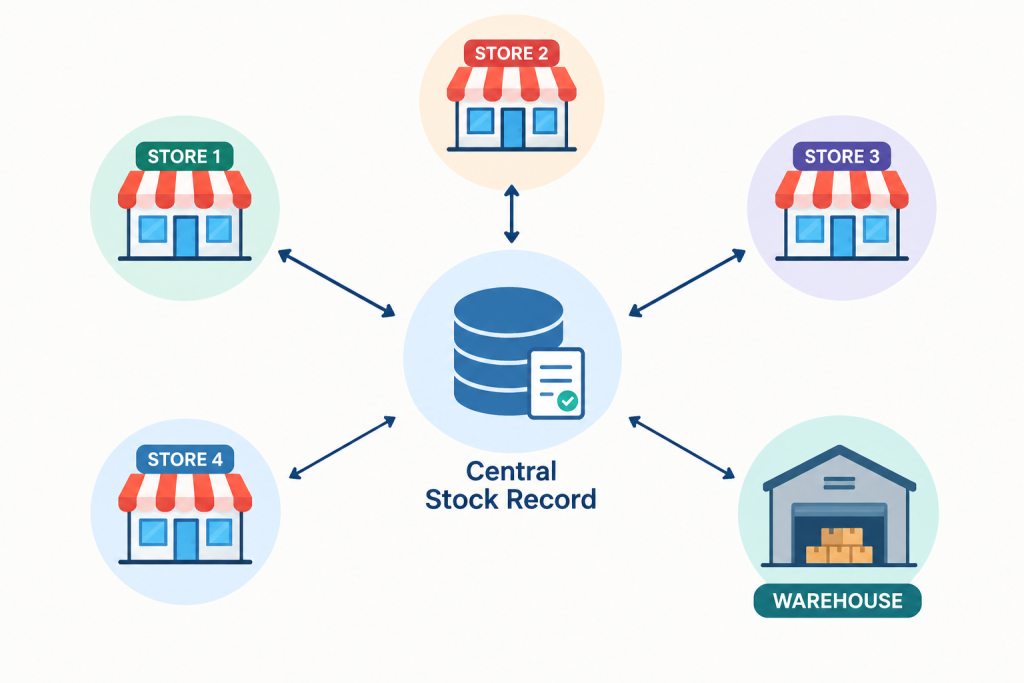
Real-time inventory sync means every sale, return, transfer and stock receipt is recorded in one shared stock record the moment it happens, and every store, warehouse and online channel sees the same numbers within seconds. Nobody waits for end-of-day updates, and nobody works from a spreadsheet that was correct yesterday.
Why stock goes out of sync across stores
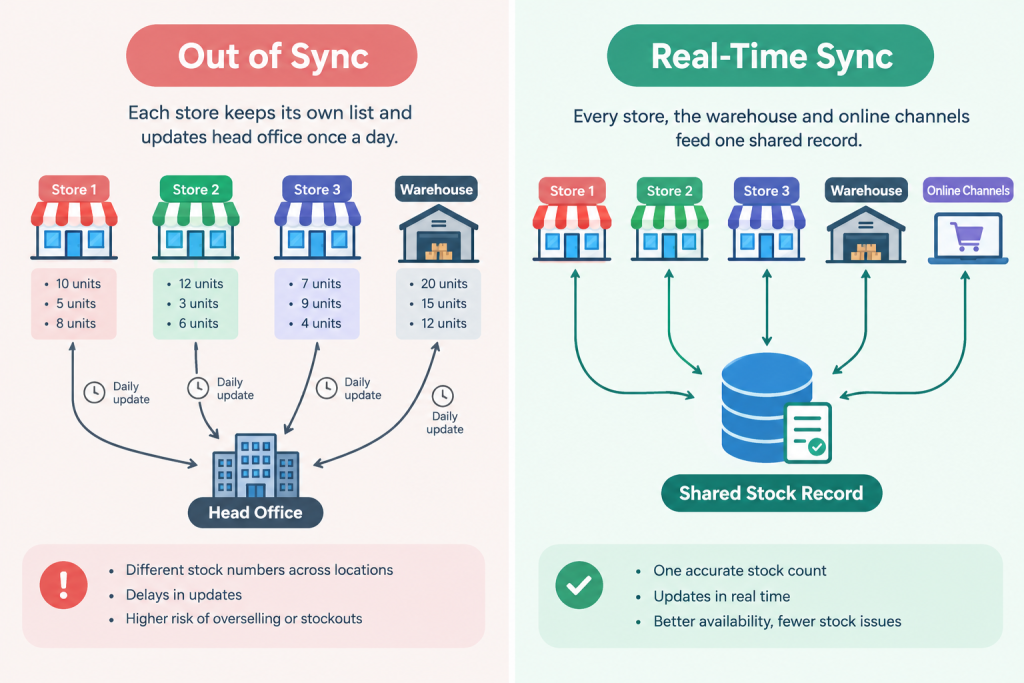
Stock goes out of sync when each store records changes on its own and shares them later. The usual causes are:
- End-of-day updates. Stores send their sales to head office once a day. For the rest of the day, every other location is working with old numbers.
- Separate stock files per store. Each branch keeps its own sheet or its own billing system. Nobody sees the total.
- Manual entry. Staff type in received goods, returns and damages. Entries get delayed, skipped or typed wrong.
- Transfers that are not tracked. Goods leave Store A on Monday and reach Store B on Wednesday. For two days, they exist in neither store’s records.
- Online orders handled separately. Your website or marketplace shows stock that was already sold at the counter.
This is mostly a process problem first and a software problem second. Software helps only when the process behind it is clear: every movement of stock must be recorded, by someone, at the time it happens.
What being out of sync costs you
There are four costs, and most owners only notice the first.
- Lost sales from stockouts. The product exists somewhere in your chain, but not where the customer is standing.
- Overselling. You accept an order, usually online, for stock you no longer have. You then cancel or delay it, and the customer remembers.
- Cash tied up in the wrong place. Slow-moving stock sits in one store while you reorder the same item for another. You pay for the same product twice.
- Staff time. People spend hours on phone calls (“do you have this in your store?”), manual counts and fixing mismatches.
There is also a quieter cost: you cannot trust your own numbers, so every buying decision becomes a guess.
A 30-minute stock accuracy check
You do not need software to find out how bad the problem is. Try this:
- Pick one store and 30 products. Include fast sellers, slow sellers and high-value items.
- Count what is physically on the shelf and in the back room.
- Compare each count with what your system says.
- Divide the number of products that match exactly by 30.
If fewer than 90 out of 100 products match, you have a stock accuracy problem. Many chains using spreadsheets or end-of-day updates find their match rate is closer to 60 or 70 out of 100. Repeat the check at a second store to see whether the problem is one branch or the whole chain.
A well-run chain usually aims for 95 out of 100 or higher.
Signs you have outgrown spreadsheets
You have probably outgrown them if any of these is true:
- Staff phone other stores to check stock before telling a customer yes or no.
- Your monthly stock count always finds large differences.
- You sell online, and have had to cancel orders for stock you did not have.
- Head office cannot say how much stock you hold across the chain without asking each branch.
- You reorder based on gut feel because the numbers are not trusted.
How real-time inventory sync works
The idea is simple. Instead of each store keeping its own record, there is one central stock record, held online. Every store’s billing system reads from it and writes to it.
Here is what happens in a typical case:
- A customer buys one unit of a product at Store A.
- The billing system at Store A records the sale and tells the central record.
- The central record reduces Store A’s stock for that product by one.
- Within seconds, Store B’s system, the warehouse and your website all show the new number.
The same happens for returns (stock goes up), stock received from a supplier (stock goes up), damaged goods (stock goes down), and transfers between stores (stock moves from one location to another, and shows as “in transit” while on the way).
What “real time” actually means
In practice, it means updates reach everyone within a few seconds. Some systems call themselves real-time but update every 15 to 60 minutes. For a chain selling fast-moving items or selling online, that gap is long enough to oversell. Ask any vendor exactly how many seconds or minutes an update takes, and ask them to show it.
When a store loses internet
A good system keeps working. The store continues to bill customers using a saved copy of its stock data. When the internet returns, it sends all the sales to the central record in the order they happened. Ask vendors to demonstrate this. If the answer is “billing stops without internet”, that is a serious risk for a busy store.
Two stores selling the last unit at the same time
With real-time sync, it is much less likely, because the second sale sees the updated number. It can still happen in the few seconds before an update arrives, or when a store is offline. The practical fixes are:
- Keep a small safety buffer for online sales on items with very low stock. For example, show online only what is above two units.
- Reserve stock the moment an online order is placed, not when it is packed.
- Have a clear rule for what happens in the rare clash: who gets the item, and how the other customer is told.
Running operations across many locations
Sync gives you correct numbers. These practices turn the numbers into good decisions.
Handling transfers between stores
Treat every transfer as two steps. The sending store creates a transfer, and stock moves to “in transit”. The receiving store confirms what actually arrived, and stock moves into that store. If the counts differ, the difference is flagged as a loss or a dispute instead of disappearing. This one habit removes most of the “missing stock” confusion in chains.
Central or store-level replenishment
For most chains, a mix works best:
- Central replenishment for fast-moving, standard items. Head office watches total stock and orders from suppliers, then sends to stores from the warehouse.
- Store-level requests for items that depend on local taste, season or events. The store manager asks for what they need, and head office approves.
Start central if your store managers are not yet trained in ordering. Move some decisions to stores as accuracy improves.
Setting reorder levels for each store
Set a minimum stock level for each product in each store, not one number for the chain. A simple way to start:
- Take the average daily sales of the product at that store.
- Multiply by the number of days it takes to get a refill (the lead time).
- Add a small safety amount, for example two to three extra days of sales.
When stock falls to that number, the system alerts you or creates a refill request. Review these numbers every quarter.
Sending stock from the warehouse to stores
Use the warehouse as the main holding point. When a store’s stock drops below its minimum level, the system suggests how much to send, based on that store’s sales. This stops the common mistake of sending equal quantities to every store regardless of how fast each one sells.
Clearing slow-moving stock and planning for demand
Live numbers show which products are not selling in one store while selling well in another. Move them by transfer before you discount them. Once a month, review everything that has not sold in 60 or 90 days.
When you set reorder levels, look at the same weeks last year, festival and wedding seasons, and local events. Some software now suggests order quantities from past sales. It only works when the sales history is accurate, which is one more reason to fix sync first.
Handling returns, damages and shrinkage
Every adjustment should have a reason (customer return, damaged, expired, theft, counting error) and a name against it. Reasons let you see patterns. If one store records far more damages than the others, you know where to look. Limit who is allowed to change stock numbers, covered below.
Running stock counts across many branches
A full count of every item is slow and shuts the store down. Instead, use cycle counts: each week, count a small group of products, such as your highest-value items or fastest sellers, and compare with the system. Over a month or quarter, every product gets checked. Differences are fixed and the cause is investigated. Do a full count once a year for accounting, if you need one.
Barcodes, RFID and scanning
Barcodes are the starting point. They are cheap, work with handheld scanners and phones, and every product variant needs its own. RFID tags let you count many items in seconds without scanning one by one, but each tag costs more, so they suit high-value or fast-counting categories such as apparel or jewellery. Many chains start with barcodes and add RFID to selected categories later.
Franchise and company-owned stores
They can share one system, but the rules differ. Company-owned stores usually follow central pricing, ordering and stock rules. Franchise stores often buy stock from you and keep their own sales records. Decide up front what franchisees can see (their own stock, and perhaps available warehouse stock) and what they cannot (other franchisees’ sales).
Connecting online orders and marketplaces to store stock
The central stock record should feed your website and marketplace listings. You then have a choice for each product:
- Ship from the warehouse only. The simplest option. Online stock equals warehouse stock.
- Ship from stores too. Online stock includes store stock, so you can fulfil from the nearest store. This sells more, but needs store staff to pick and pack.
- Click and collect. The customer orders online and picks up at a store. The system reserves the item at that store.
Start with the simplest option and add store fulfilment once your store counts are reliable.
Managing prices, taxes and offers by location
Keep one product list, and let prices and offers be set per location or group of locations. For India, make sure the system handles GST correctly for sales within and between states, and that invoices follow the required format. Ask the vendor to show a sample GST invoice and a stock transfer between two states.
How stock tracking differs by type of store
The idea of one shared stock record is the same everywhere, but what you track changes with what you sell.
- Apparel and footwear: every size and colour is its own item. Most mismatches come from the wrong variant being scanned, so each variant needs its own barcode. Seasonal clearance makes fast transfers between stores worth more.
- Grocery and FMCG: batch numbers and expiry dates matter, and the oldest stock should sell first. Turnover is fast, so updates must be fast too.
- Electronics and appliances: each unit has a serial number and a warranty. Items are high in value, so count them more often.
- Jewellery: each piece is tracked by tag, with weight, purity and making charges. The value per item is high, so daily counts and strict permissions matter. Mindster has worked with a large jewellery retailer, described in the case study below.
What management should be able to see
Owners and head office should be able to answer these questions without calling anyone:
- How much of each product is in each store and in the warehouse right now?
- Which products are selling fast, and which have not sold in 60 or 90 days?
- What stock is in transit, and for how long?
- Which stores have the most adjustments, damages or count differences?
- Which items are about to run out?
The reports that answer these are branch-wise stock, fast and slow movers, stock ageing, transfer reports and adjustment reports. You should be able to open them on your phone.
Controlling who can change stock
Give each role only what it needs. A typical setup: cashiers can bill and process returns up to a set value; store managers can approve adjustments and request transfers; warehouse staff can receive and dispatch; head office can see everything and change reorder levels. Every change should be logged with the user’s name and time. Set alerts for unusual actions, such as a large stock reduction or many adjustments in one day.
Choosing the right tool
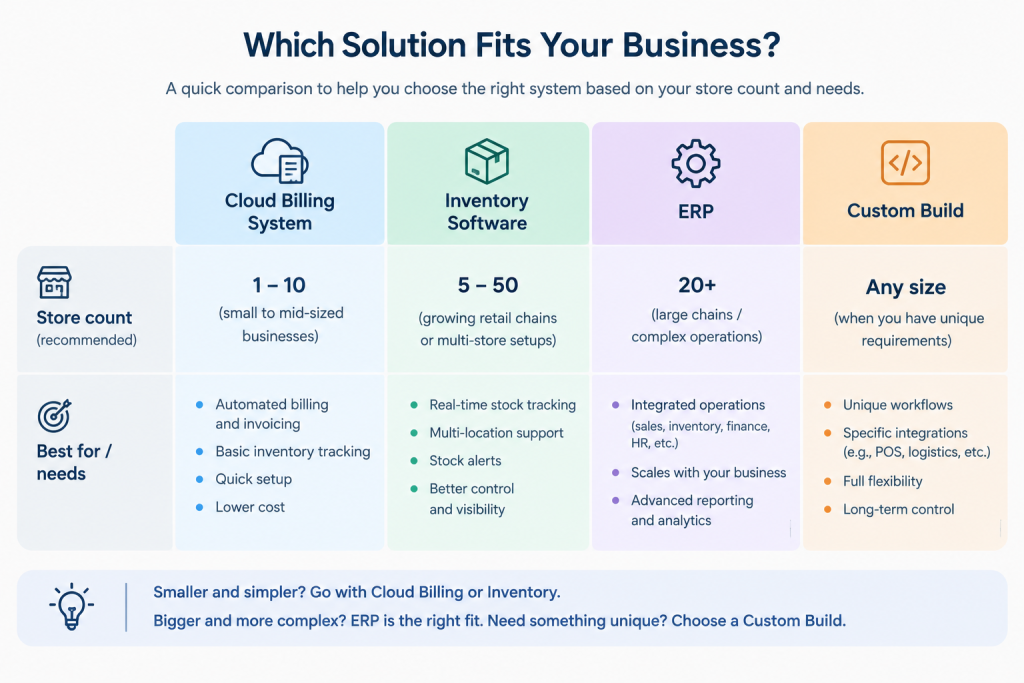
There are three common options, and the right one depends on what else you need.
- Cloud billing (POS) system with inventory. Good for chains that mainly need billing and stock across stores. Quick to start.
- Standalone inventory software. Good when you already have billing and accounting you are happy with, and you need stock control to connect to them.
- ERP (one system for billing, stock, buying and accounts). Good for larger or growing chains that want everything in one place. Takes longer to set up.
If you have 3 to 5 stores, a cloud billing system with strong stock features is usually enough. If you have a warehouse, many suppliers and online sales, look at ERP or inventory software that connects to your other systems.
Inventory software or ERP
Inventory software tracks stock. An ERP (enterprise resource planning system) puts stock, billing, buying and accounts into one system. If you only need to fix stock and billing across stores, inventory software or a cloud billing system is faster and cheaper to start. If you also want to automate buying, supplier payments and accounts, an ERP makes more sense. Many chains start with the first and connect to the second later.
Cloud or on-premise
Cloud software runs on the vendor’s secure servers and opens in a browser or app. For a chain, it is usually the better choice: every store sees the same data, and you do not maintain servers. On-premise software runs on servers you own. It gives more control, but each store depends on a connection to your server, and you manage backups and repairs yourself.
Connecting to accounting software and online channels
Your stock system should feed your accounting software, such as Tally or Zoho Books, so purchases, sales and stock values match. It should also feed your online channels, such as your own website, Shopify, Amazon or Flipkart, so listings show real stock. Ask each vendor whether a ready-made connection exists for the tools you use. If it does not, a developer can usually build one through the tool’s integration options.
Must-have features
- One central stock record for all locations, updated within seconds
- Works offline and catches up when the internet returns
- Transfers with in-transit tracking
- Reorder levels per product per store
- User roles and a log of every stock change
- Barcode scanning
- GST-ready invoices
- Connection to your website, marketplaces and accounting software
Nice to have
- Automatic suggestions for how much to send to each store
- Demand forecasting
- Staff apps for stock counts on a phone
- Alerts sent by WhatsApp or SMS
Questions to ask vendors during a demo
- Show me a sale at one store and the stock change at another store. How many seconds does it take?
- Show me billing with the internet switched off, then reconnecting.
- Show me a transfer from start to finish, including a case where fewer items arrive than were sent.
- How do you connect to my website, marketplace and accounting software? Which connections are ready-made and which are custom?
- What does the price include? What costs extra (extra stores, users, support, training, data import)?
- Can I speak to a retailer with a similar number of stores?
- What happens to my data if I leave?
Build or buy
It depends on how standard your operation is. A ready-made system is faster and cheaper to start when your stores work in a common way. Custom software makes sense when your workflow is unusual, when ready-made tools do not connect to the billing or accounting system you already use, or when you want to own the system and shape it as you grow. A good development partner will tell you honestly which fits, and may suggest starting with a ready-made tool and building only the missing pieces.
Cost and time to set up
Cost. Most vendors charge per store or per user each month, plus a one-time fee for setup. Hardware such as barcode scanners, printers and tablets is usually extra. Ask about these costs that often go unmentioned: importing your product list, training, connections to other systems, and charges for extra stores.
Time. A small chain can be live in two to six weeks. A larger chain with a warehouse and online sales may need two to four months. Most of the time goes on cleaning product data and training staff, not on the software.
Working out whether it pays for itself
Add up what poor sync costs you each year, then compare it with the yearly cost of the system.
Here is an example with made-up numbers for a chain of 8 stores:
- Sales lost to stockouts: 2% of ₹10 crore = ₹20 lakh. If your margin is 25%, that is ₹5 lakh of profit lost.
- Excess stock that has to be discounted: ₹15 lakh of stock marked down by 30% = ₹4.5 lakh.
- Staff time spent on calls, counts and fixes: 2 people for 4 hours a day, about ₹3 lakh a year.
Total yearly loss: about ₹12.5 lakh. If the system costs ₹4 lakh a year and fixes even half of the problem, you are ahead in the first year. Replace these numbers with your own before deciding.
Want to know what poor stock sync costs your chain?
Share your store count, yearly sales and your biggest stock problems. We’ll help you estimate your losses and what a fix could return, using your numbers instead of the example in this guide.
Get your estimateMoving from spreadsheets without disrupting sales
- Clean your product list first. One name, one code and one unit of measure for each product.
- Count your stock. Start the new system with a true opening count, not the old spreadsheet numbers.
- Pilot in one store. Run the new system there for two to four weeks. Fix problems while the risk is small.
- Roll out in groups. Add two or three stores at a time.
- Keep the old system as a backup for a short period, then switch it off.
Getting store staff to use it
Train on real tasks, such as billing, receiving stock and doing a transfer, not on menus. Pick one person in each store as the go-to expert. Explain why accurate entries matter: fewer calls, fewer disputes, and no blame for differences that are caught early. Check the numbers weekly during the first month and talk to stores about mistakes right away.
Why inventory sync projects fail
The software is rarely the reason. The common causes are:
- Messy product data. The same item appears under two names or codes, so stock splits across duplicates. Fix this before you start.
- Skipped steps in stores. Staff receive goods without recording them, or bill an item under a different code. The system is only as accurate as the entries.
- No owner. Nobody at head office is responsible for stock accuracy. Name one person.
- Rolling out everywhere at once. Problems are found in all stores at the same time.
- No regular checks. Without weekly cycle counts, small errors build up until the numbers are not trusted again.
Keeping data clean
- Give every product variant (for example, a shirt in size M and blue) its own code and barcode.
- Use one naming rule, written down, for all products.
- Use one unit per product (pieces, not a mix of pieces and boxes) or set clear conversion rules.
- Do not allow staff to create new products at the counter without approval.
Data security and backups
Choose a vendor that stores data on secure cloud servers, backs up daily, and lets you set user permissions. Ask where the data is stored and how you can export it. Never share one login among several staff members, because it removes your ability to see who changed what.
How Mindster helps retail chains get stock right
Mindster has built mobile apps, web platforms and custom software since 2009, with more than 500 applications delivered. For retail chains, we apply that experience to one goal: every store, the warehouse and your online channels work from the same stock numbers.
Here is how we usually approach it.
- Start with your daily work, not the software. We follow one sale, one return, one transfer and one delivery through a store and the warehouse. This shows where the numbers go wrong, and it is often a process gap rather than a software gap.
- Build one central stock record. Every store’s billing, the warehouse and your website read from and write to the same place. Wherever possible, we connect it to the billing and accounting tools you already use, so you do not replace what works.
- Put stock tasks on staff phones. A mobile app lets staff scan goods on arrival, confirm transfers and run cycle counts at the shelf, so stock is recorded at the moment the work happens.
- Keep stores selling when the internet drops. We design billing to keep working offline and update the central record when the connection returns.
- Pilot first, then roll out. We launch in one store, fix what we find, then add stores in small groups, with staff training and support after launch.
- Give owners a clear view. Live stock by store, slow movers, transfers in transit and low-stock alerts, all on a phone.
When custom software makes sense
A ready-made tool is enough for many chains. Custom software is worth considering when:
- Your workflow is unusual, for example made-to-order items, weight-based goods or franchise stores with their own rules.
- Ready-made tools do not connect to the billing or accounting system you use.
- You want your own branded app for customers or staff.
- You want to own the system and change it as your chain grows.
If a ready-made tool fits, we will tell you so. Often the best answer is a ready-made base with custom pieces built only where it falls short.
Want your stores and ERP to share the same numbers?
We build staff scanning apps and automatic refill systems that connect to the billing, accounting and ERP tools you already use, so you don’t have to replace them.
Discuss your setupCase study: how Malabar Gold & Diamonds closed the gap between its stores and its ERP
Malabar Gold & Diamonds is one of the world’s largest jewellery retail chains. Mindster built a stock tracking and refill platform for it that now runs across more than 50 stores. The stock in question was not gold. It was the brand’s custom velvet boxes and silk pouches, which are costly supplies that every store uses all day. The problem was the same one this guide is about: the stores and head office did not share the same numbers.
The problem. Packaging was not tracked item by item across branches, so what stores used on the shop floor never reached the central ERP (Microsoft Dynamics 365) reliably. That led to four problems:
- Unexplained losses and unauthorised use of packaging.
- Store supervisors spending hours matching physical counts against daily sales receipts.
- Stockouts in peak wedding and festival seasons, because refills were ordered by hand and too late.
- Purchasing teams spending long hours drafting refill purchase orders for each branch.
What Mindster built. The aim was to fix the gap without replacing the ERP the company already used.
- A mobile app for store staff. Staff scan the customer’s receipt, and the app pulls the purchase details from the ERP and shows the right box size for the item sold. Supervisors group completed packaging orders to match physical stock with billing records.
- Automatic refills. The system works out each branch’s needs from live stock levels, drafts refill purchase orders for many branches on scheduled days, and tracks each refill until the ERP confirms the stock transfer.
- A two-way link with the ERP. Sales invoices, stock adjustments and transfers pass between the app and the ERP through secure connections, so the core system stayed as it was.
- A name on every action. Staff sign in with their employee ID, so every scan and adjustment is recorded with who did it and when.
Results reported by Mindster.
- 30% less packaging waste
- 70% less admin work on refill orders
- No seasonal stockouts
- 100% accuracy on the automated sales-order and stock-transfer entries
What retail chains can take from this. Record stock where the work happens, which here was a scan on the shop floor. Connect to your existing system instead of replacing it. And let live stock levels, not guesswork, trigger the refill orders.
Read the full story in Mindster’s Malabar Gold & Diamonds case study.
Where to start
This week, run the 30-product accuracy check at two stores. If the results are poor, write down your top three problems (for example, transfers, online orders, month-end counts) and use the demo checklist above to compare two or three vendors. Pilot in one store before you commit to the whole chain.
Talk to Mindster about your stores
If you run several stores and want to fix stock accuracy, start with a short call. Bring three things: the number of stores and warehouses you have, the billing and accounting software you use today, and your top three stock problems. We will tell you whether a ready-made tool or a custom build suits you, and what a pilot in one store would involve.
Ready to pilot live stock sync in one store?
Start small. We will review your billing and accounting tools, recommend a ready-made or custom approach, and plan a pilot you can test before rolling out to every store.
Request a consultation
Akhila drives the content strategy at Mindster, combining analytical clarity with a passion for digital product innovation. With a deep focus on mobile app strategy and software solutions, she bridges the gap between engineering complexity and intuitive user experiences. She thoughtfully articulates tech concepts, transforming frameworks, case studies, and digital transformation trends into actionable insights for product teams and business leaders.


