
The 2-Minute Summary
- Poor quality is expensive. Crashes lead to uninstalls, bad reviews, lost sales, and wasted marketing spend.
- You cannot test everything, so test what matters most. Put the most effort into login, search, cart, and payments.
- Use both machines and people. Automation handles repetitive checks quickly. Humans find the strange, real-life problems.
- Look beyond "does it work." A good app also has to be fast, light on battery, secure, compliant, and reliable on many different phones.
- Run 8 final checks before every launch. They prevent most of the painful surprises on release day.
- Choose your QA setup to fit your stage. Keep product knowledge in-house, and use partners for devices, specialist skills, and extra capacity.
A few years ago, an e-commerce app pushed a big feature update just in time for Black Friday. The designs were polished, the developers had signed off, and everyone was confident. Ten minutes after launch, customers were filling their carts, tapping “Pay Now,” and landing on a dead screen.
The cause was one small code change that broke the payment confirmation step for people on an older version of iOS. By the time a fix went out, thousands of dollars in sales were gone and the app’s store rating had taken a hit.
That day taught our team something we still repeat: users will not appreciate a beautiful feature if the app breaks at checkout. Quality assurance (QA) is not just about finding bugs. It protects your revenue and your users’ trust.
This guide explains how to approach mobile app QA in plain language, whether you are a founder, a product owner, or a business leader deciding how much to invest.
2. The Real Cost of Poor App Quality
It is easy to see QA as a speed bump or an optional line in the budget. The picture changes the first time a serious bug reaches your customers.
Users have very little patience. Most people will give an app a couple of chances. If it crashes, freezes, or fails at an important moment, they delete it and often try a competitor. For a business, that means the money spent on ads and campaigns to win that user is lost within minutes. Imagine paying to attract someone to a fitness app, only for the “Start workout” button to freeze on day one.
Bugs show up in your public rating. When you read the 1-star reviews on any app store, a large share of them mention crashes, slow screens, or broken features. A lower rating means fewer people download your app, because shoppers filter out poorly rated apps before they ever read your description. Weak quality quietly shrinks your organic growth.
Big companies are not immune. Sonos rolled out a redesigned app that was missing features people relied on and was widely reported to be slow and unreliable. The backlash was public and loud, and it became a well-known example of what rushing a major release can cost a brand.
Small checkout bugs can be just as costly. Picture a delivery app that ships a routine update before a busy weekend. A small change to how checkout data is sent goes live without full testing. Here is what happens next:
- The money leaves, the order does not appear. The customer is charged, but the app never records the order and shows a spinning wheel or a “Transaction failed” message.
- Customers react. Some abandon the cart. Others call their bank and dispute the charge.
- The team scrambles. Support lines fill up, conversion drops sharply, engineers drop everything for an emergency fix, and 1-star reviews pile in.
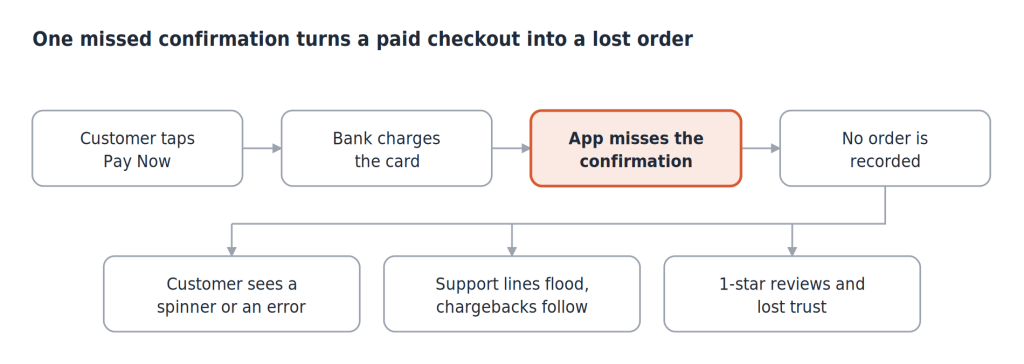
silent checkout failure · 4 steps, 3 consequences
Why finding bugs early saves money. The same problem costs very different amounts depending on when you catch it:
| When the problem is found | What it takes to fix | Business impact |
|---|---|---|
During design review | A short conversation and a small change | Almost none |
During development | A developer fixes it and retests | Low |
During testing | Fix, retest, and possibly delay the release | Moderate |
After launch | Emergency fix, support load, refunds, bad reviews | High, and sometimes lasting |
This is why we involve QA early, at the design stage, instead of waiting until the app is built. Take a money-transfer feature. A QA lead reviewing the screens will ask what happens if a user on a weak connection taps “Transfer Now” twice. Without a safeguard, the money could be sent twice. Asking that question in a 15-minute design review costs nothing. Discovering it in production means double charges, angry customers, and chargebacks.
Three simple numbers worth tracking: your crash-free session rate, your checkout completion rate, and your app store rating. If any of them drops after a release, quality is costing you money.
3. The Executive QA Matrix: Where Automation Wins and Where Humans Win
One common mistake is going to an extreme. Some teams try to automate every test and remove people from the process. Others rely on testers to check everything by hand before each release. Neither works well.
- Fully manual testing is slow and expensive. If testers spend three weeks checking every screen before each release, competitors will ship new features while you are still testing.
- Fully automated testing misses what people notice. Scripts cannot tell you whether an app feels confusing, awkward, or frustrating.
A healthy approach splits the work. As a rule of thumb, let automation handle roughly 80% of the routine, repeatable checks, and keep around 20% of the effort for human testers who explore, question, and think like real users. Treat these numbers as a starting point, not a law.
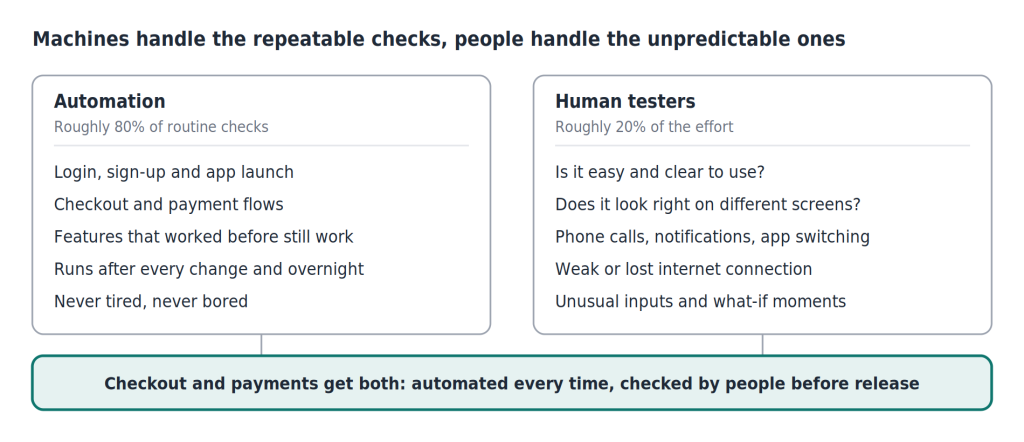
automation vs human testing · 2 columns, 1 shared band
Here is a simple matrix to decide who tests what:
| What needs checking | Best handled by | Why | How often |
|---|---|---|---|
Login, sign-up, and basic app launch
| Automation | Simple, predictable, and must work every time | Every code change |
Checkout and payment flows | Automation first, then human spot checks | Highest revenue risk, so it needs both | Every code change, plus before each release
|
Features that worked before still work (regression) | Automation | Repetitive and perfect for machines
| Overnight and before each release
|
Look and feel on different screens
| Human, with visual tools to help
| Needs a human eye for what looks right
| Each release candidate
|
Ease of use and confusing screens
| Human
| Machines cannot judge how something feels
| Each release candidate
|
Phone calls, notifications, app switching
| Human | Real life is messy and hard to script
| Each release candidate
|
Weak or lost internet connection | Human, with network tools | Needs realistic, unpredictable conditions | Each release candidate |
Unusual inputs and "what if" scenarios | Human (exploratory testing) | Needs curiosity and creativity | Each release candidate |
Heavy traffic and security | Specialist testing | Needs special tools and expertise | Before major launches |
How we decide what to test first. You will never have time to test everything, so test by business risk. A small visual glitch on an “About Us” page is annoying, but customers will still order their dinner. A “Place Order” button that freezes costs you the sale. We sort features into critical, major, and minor, and put most of our hands-on effort into the critical ones: login, search, cart, and payments.
Where robots win. Automated tests do not get tired or bored. Every time a developer submits new code, a quick automated check confirms the app still opens, the user can log in, and the key screens work. If something fails, the build is stopped before it reaches the testers. Overnight, a bigger set of automated tests runs across many phone models to make sure new changes have not quietly broken older features. A banking app, for example, can automatically confirm after every update that login, balances, and currency conversion still work. For an overview of the methods and tools teams use, see our guide to mobile app testing techniques and tools.
Where humans win. Imagine a rider entering card details in a moving taxi. A phone call comes in, they reply to a message on low battery, they lose signal in a tunnel, and then come back to the app five minutes later. A script rarely tests that chain of events. A human tester can, and can also judge whether the app’s recovery feels reassuring or alarming. Freed from repetitive checks, our testers spend their time on this kind of real-world thinking. To go deeper on how an app feels to real users, read our mobile app usability testing guide.
QA does not stop at launch. Even the best test lab cannot copy millions of real users on different phones and networks. After release, we watch crash reports, roll new features out to a small group of users first, and expand to everyone in stages. That way, a problem affects a few people instead of everyone.
A note on AI in QA. AI tools are starting to help. They can repair automated tests that break when a button moves, and they can spot overlapping or cut-off text on many screen sizes. They save time on maintenance, but they support QA engineers rather than replace them.
Ship Your Next Release With Confidence
Our engineers will review your key user journeys, device coverage, security basics, and release readiness.
Talk to Our Engineers4. Core Testing Coverage: The Four Areas Every App Must Pass
Many teams assume an app is ready if it opens and the buttons work. Users judge apps on much more than that. We look at four areas.
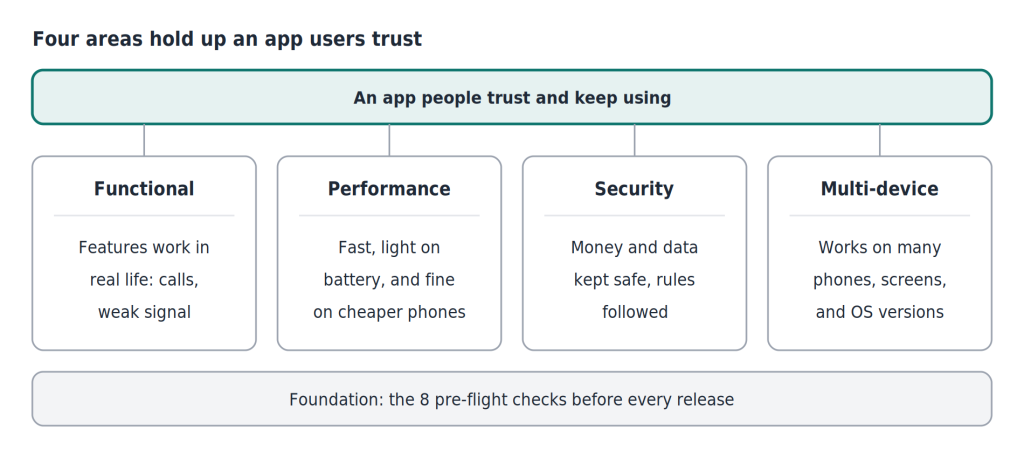
four testing areas · 4 pillars on a pre-flight base
Functional testing: does it work in real life?
This checks that every feature does its job, including when life gets in the way. People use apps while walking, riding elevators, receiving calls, and switching between apps.
- The interrupted upload: A user taps “Post” on a photo app and gets a phone call halfway through. The upload should pause and resume, not crash or vanish.
- The tunnel: A user is downloading a playlist or checking a route and loses signal. The app should show a clear offline message and use saved data, not freeze.
- The double tap: A user taps “Place Order” twice because the network is slow. The app must not charge them twice.
Performance, battery, and device strain: is it light and fast?
People delete apps that make their phones slow, hot, or drained. A driver using a ride-hailing app all day shares their location constantly. If the app is not well built, it can drain the battery before the shift ends.
It also matters how the app behaves on cheaper, older phones with less memory. We have seen features such as a QR code scanner freeze on budget devices even though they worked fine on a flagship phone. Testing on low-end devices is how you catch this before your customers do.
Security and compliance: is it safe and lawful?
Phones get lost, stolen, and connected to risky Wi-Fi every day. For banking, payment, and bill-pay apps, security is not optional.
- Unsafe phones: Apps that handle money should detect phones whose built-in protections have been removed (known as rooted or jailbroken devices) and limit what can happen on them.
- Unsafe networks: The app should refuse to talk to anyone pretending to be the bank’s server, even on public Wi-Fi.
- Expert break-in tests: Before launch, enterprise apps should go through security testing where specialists try to break in the way a real attacker would, then report what they find.
Compliance means following the rules that apply to your app. Depending on your market and industry, this can include payment card standards (PCI DSS), data privacy laws (such as GDPR in Europe or India’s DPDP Act), financial regulators (such as the RBI in India), and accessibility guidelines (WCAG) so that people with disabilities can use your app. Each carries real consequences for non-compliance, so build them into your test plan from the start.
Multi-device testing: does it work on every phone?
Unlike a website, a mobile app has to work across thousands of different phones, screen sizes, and software versions. Your app should not only look good on your developer’s newest phone.
- Foldable phones: A customer unfolds their phone mid-checkout. If the layout does not adjust, the “Pay Now” button can end up off-screen.
- Notches and curved screens: On some phones, a close button or heading can hide behind the camera cutout.
- Older software and large text: Many people, including older users, set their phone’s text size to maximum. If the app cannot handle that, text gets cut off and buttons become unusable.
Want the detail behind each type of testing? Read our complete guide to mobile app testing types and benefits.
5. The Pre-Flight Release Checklist: 8 Checks Before You Submit
Submitting to the Apple App Store or Google Play without a final check is a real risk. These eight checks catch the problems that most often ruin launch day.
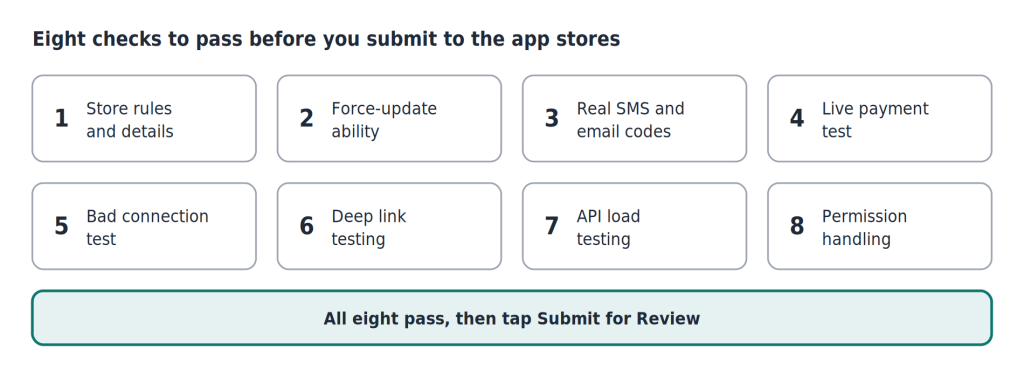
pre-flight checklist · 8 checks
- Store rules and details. Confirm the app name, icon, screenshots, and description are accurate and follow Apple and Google guidelines. If users can create an account, they must be able to delete it from within the app, and your privacy policy links must work. Missing these is a common reason for rejection.
- Force-update ability. Make sure you can require users to update. If a serious bug or security flaw escapes, the app should be able to block the old version and send people to the store to update.
- Real SMS and email delivery. During testing, teams often skip verification with dummy codes. Before launch, confirm that real one-time passwords and activation emails arrive quickly. A code that takes ten minutes to arrive costs you a new user.
- A real payment test. Sandbox payments are not the same as live ones. Make a small real purchase on the live app and confirm the money is processed, the receipt is sent, and the account upgrades. Also check that declined cards show a helpful message.
- A bad connection test. Try the app on a slow or disconnected network. It should show a clear offline message, retry safely without charging twice, and never spin forever.
- Deep link testing. When someone taps a promo link in an email or message, they should land on the exact product page, not a generic home screen. Otherwise most people give up.
- Load testing. Your test environment feels fast because few people use it. On launch day, thousands of people arrive at once. Simulate a busy day, and a very extreme one, to make sure your servers do not slow down or fail.
- Permission handling. If someone taps “Don’t Allow” for camera or location, the app should explain why it needs access and offer another way forward, such as typing in an address, instead of crashing.
6. Partnering for QA vs. In-House: How to Decide as You Scale
Every company needs a different QA setup. A growing app with a handful of modules does not need what a bank with millions of customers needs, and a bank cannot rely on developers checking a few features by hand.
The right choice depends on your size, budget, team, business risk, and how complex your app is.
Scale-ups: build structure. As your app grows, one person can no longer keep track of everything. Assign QA owners to key areas, such as sign-up, payments, search, and notifications, so each person builds deep knowledge of those features and their risks. At this stage, you also decide how much testing to run in-house and how much to share with a partner.
Enterprises: prioritize reliability. When an app handles millions of transactions and sensitive data, a defect can mean financial loss, penalties, and reputational damage. Internal QA leads set the strategy, standards, and automation approach. External partners can provide large device labs, testing across regions and time zones, and specialist services such as security testing, performance testing, and accessibility testing.
How the options compare:
| In-house QA | External QA partner | Hybrid | |
|---|---|---|---|
Product knowledge | Deep and ongoing | Needs time to learn your product | Strong where it matters |
Device and tool costs | You buy and maintain them
| Included in the service
| Shared
|
Speed to scale up
| Slow (hiring and training)
| Fast
|
Fast
|
Specialist skills (security, load, accessibility)
| Expensive to build
| Readily available
| Available when needed
|
Best for
| Core product knowledge and ownership
| Extra capacity and device coverage
| Most growing and large teams
|
Most companies end up with a hybrid. Keep the work that needs deep product knowledge and long-term ownership inside your company, and bring in partners where they give you better device access, specialist skills, or extra capacity.
Questions to ask when evaluating a QA partner:
- Do they have a wide range of real devices and operating system versions?
- Do they have experience in your industry, such as fintech, retail, or healthcare?
- Will they give clear, regular reports you can actually understand?
- How do they protect your code, data, and confidential information (NDAs, access controls)?
- How quickly can they start and scale testing up or down?
- Can they cover specialist testing such as security, performance, and accessibility?
- Is the pricing model transparent, and does it fit how often you release?
One last principle. A release should not be approved simply because testing is finished. It should be approved when the app meets the quality standards you agreed on, and the people responsible understand and accept the risks that remain.
7. Find Out Where Your App Stands
If you are unsure whether your app is ready for its next release, or whether your current QA setup can keep up with your growth, a second opinion helps.
Mindster’s engineering team offers an app audit that looks at the areas covered in this guide: your most important user journeys, how the app behaves across devices and poor networks, security and compliance basics, and how ready your release process is. You get a clear view of where the risks sit and what to fix first.
Share your app and release plan, and we’ll tell you where the risk is.
Not Sure Your App Is Ready to Launch?
Share your app and release plan, and we will tell you where the risk is.
Get Your App Audit
Shinoj AV is a seasoned QA professional currently serving as the QA Lead at Mindster. With extensive hands-on expertise in software quality assurance and testing methodologies, he plays a pivotal role in leading testing teams and ensuring the delivery of robust, high-performance mobile and web applications. Passionate about software reliability and engineering excellence, Shinoj is dedicated to driving rigorous testing standards, optimizing quality workflows, and delivering seamless digital experiences for clients worldwide.