

Monolithic vs Headless vs Composable Commerce: Which Architecture Does Your Business Actually Need?

Mindster helped a large jewelry retailer chain with a global footprint to replace paper-based stock-taking with a connected mobile and web inventory audit platform. Barcode scanning, automated calculations, digital approvals, and Microsoft Dynamics AX integration helped reduce a standard stock-taking cycle from 4 hours to 30 minutes.

The client is a large jewelry retailer with presence in 14 countries across Asia-Pacific, the Middle East and Europe. Considering their global inventory stock and huge daily transaction volumes, accurate inventory records are essential to day-to-day operations and financial control. Their existing stock-taking process depended on manual calculations, paper records and physical document routing, making audits time-consuming, and delaying updates to the enterprise resource planning (ERP) system.
The objective was to digitize inventory counting and verification through a mobile application for on-floor users and a web portal for approvers and administrators. The platform also needed to handle untagged items, support a four-level approval workflow, and exchange inventory data with Microsoft Dynamics AX.
The Challenges
Inventory audits must balance speed with accuracy, verification, and financial control. In the existing process, staff recorded physical counts on paper, performed weight and purity calculations manually, and passed documents between multiple reviewers. This made it difficult to identify discrepancies at the point of counting, follow the status of an audit, and maintain a record of decisions. Because updates did not flow promptly into Microsoft Dynamics AX, physical stock and ERP records could remain out of sync until the approval process was complete.
Auditors calculated weights and purity values manually while working on the retail floor. Repeated arithmetic and transcription increased the chance of inconsistent entries, particularly when large volumes of high-value items had to be checked. Errors could then require additional verification before the inventory record could be approved.
Stock information, supporting documents, and verification records are moved through a paper-based process. Finding a specific record, confirming which version had been reviewed, or reconstructing why an adjustment was made could take additional effort. Physical records also made it harder for stakeholders to see audit progress without contacting the people handling the paperwork.
The required four-level approval chain depended on physical document hand-offs between reviewers. Each hand-off could add waiting time, and the inventory data could not be finalized in the ERP until the required checks were completed. The business needed to preserve its approval controls while making routing and review more predictable.
Items without barcodes could not follow the same quick scan-and-record path as tagged products. Staff had to associate each item with available master or historical records and calculate relevant weight and purity values. This made untagged stock a particularly effort-intensive part of the audit and increased the need for consistent validation rules.
When floor-level counts and adjustments were not transferred promptly to Microsoft Dynamics AX, the data of underlying physical stock can differ from the ERP ledger. This delay complicated reconciliation and made it harder for back-office teams to work from current inventory information during the audit cycle.
Paper records did not provide the same easily searchable history as a digital workflow. Reviewers needed a clearer way to see who entered information, who approved it, and what supporting evidence was captured. This lack of transparency slowed down the verification process and made investigating historical discrepancies highly inefficient.
CLIENT REQUIREMENTS
The client didn’t just need an app; they needed a workflow transformation that could sit between their core ERP and the physical retail floor. The primary requirements were:
A mandate to eliminate physical invoice handovers and transition to a 100% digital “E-Invoice” workflow.
A system that could “grab” data from the ERP and instantly alert the packing and delivery teams the moment a payment was confirmed.
Moving away from verbal updates to automated WhatsApp and SMS notifications, providing customers with a “soft copy” of their invoice and live status alerts.
A way to manage customer flow using digital tokens that could be assigned, tracked, and reused across different retail outlets.
THE SOLUTION
Mindster delivered a connected mobile and web inventory audit platform that brings floor-level stock capture, departmental verification and administrative control into one workflow. The Flutter mobile app helps auditors record inventory where the count takes place, while the Laravel-based web portal supports review, approval routing, tolerance configuration, and reporting. A custom API integration with Microsoft Dynamics AX connects audit activity with the existing ERP environment, reducing dependence on paper records and repeated manual data entry.
Audit execution
The Flutter mobile application supports inventory auditors and verification of users working on the retail floor. Its scanning and stock-entry workflows are designed to capture product information close to the source, helping teams record counts and supporting evidence as part of the audit rather than transferring notes into a system later.
Barcode scanning
The device camera scans product and storage-tray barcodes so staff can identify inventory records and enter counts without repeatedly typing item details. This makes the stock-taking process more consistent and reduces data-entry effort.
Barcoded and untagged stock entry
The hybrid stock-entry workflow supports products with barcodes as well as untagged “Other Items.” This is important where every item cannot be identified through a standard barcode, and staff must associate the physical item with the relevant available records.
Automated weight and purity calculations
The application applies configured calculation logic to weight-based inventory and groups items by standardized purity levels. By moving these calculations into the digital workflow, the solution reduces dependence on manual arithmetic and makes the basis for stock entries easier to review.
Photo evidence
Auditors can capture images of weighted items and store them with the audit records. This visual evidence gives reviewers additional context when checking an entry or investigating a discrepancy, alongside the recorded inventory information.

Figure 1 : Mobile inventory auditing system featuring a retail app for barcode scanning.
Admin verification
The Flutter mobile application supports inventory auditors and verification of users working on the retail floor. Its scanning and stock-entry workflows are designed to capture product information close to the source, helping teams record counts and supporting evidence as part of the audit rather than transferring notes into a system later.
Barcode scanning
he device camera scans product and storage-tray barcodes so staff can identify inventory records and enter counts without repeatedly typing item details. This makes the stock-taking process more consistent and reduces data-entry effort.
Barcoded and untagged stock entry
The hybrid stock-entry workflow supports products with barcodes as well as untagged “Other Items.” This is important where every item cannot be identified through a standard barcode, and staff must associate the physical item with the relevant available records.
Automated weight and purity calculations
The application applies configured calculation logic to weight-based inventory and groups items by standardized purity levels. By moving these calculations into the digital workflow, the solution reduces dependence on manual arithmetic and makes the basis for stock entries easier to review.
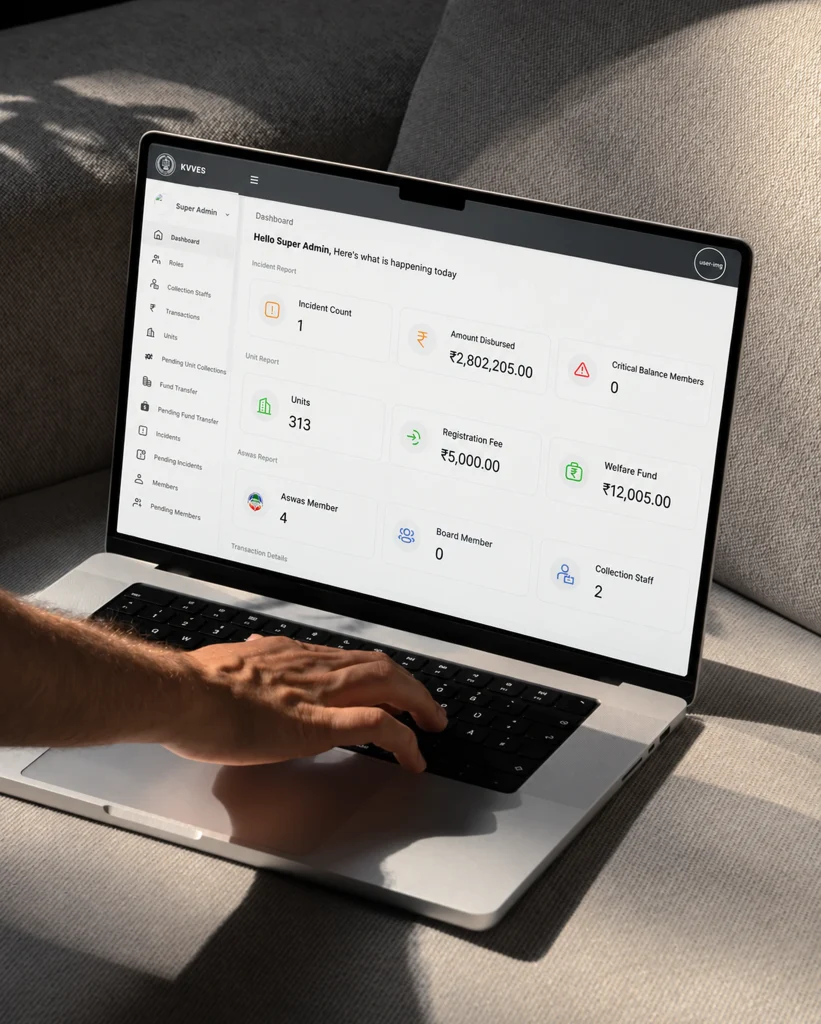
Figure 2: KVVES web portal for multi-tier fund governance and administrative oversight
Admin verification
The web portal provides a structured approval process for inventory entries, replacing physical document movement with a digital sequence. Authorized stakeholders can review submitted data, progress entries through the required approval levels and consult on the recorded history, helping reduce delays between the initial count and final acceptance.
Sequential approval routing
The system routes inventory entries through the configured four-level review chain, directing each entry to the relevant department or approver.
Count-in/count-out handling
Process untagged “Other Items” against available system records. This helps staff account for items that do not follow the standard barcode flow and supports a more complete inventory audit record.
Audit history
Record user actions to improve traceability across entry, review and approval activities. This supports operational review by making it easier to understand how an entry progressed and which users participated in the process.
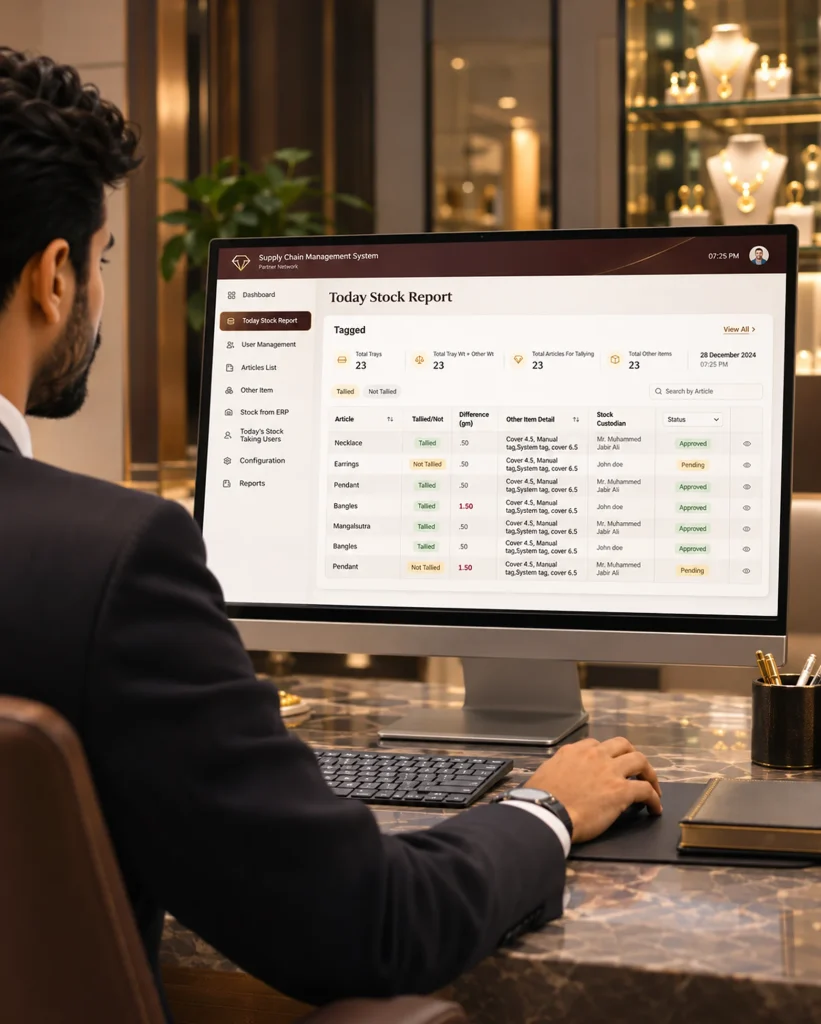
Figure 2 : A dashboard displaying the 'Today Stock Report' for digital inventory approval.
COMPLIANCE & CONTROLS
The administration portal provides a central place to manage key inventory audit settings and oversee application activity. It also connects the mobile and web workflows to Microsoft Dynamics AX, helping maintain continuity between physical stock-taking and the organization’s ERP inventory records.
Microsoft Dynamics AX integration
A custom API layer supports two-way exchange of inventory and audit information between the application and Microsoft Dynamics AX. This integration is intended to reduce duplicate entry and help audit updates flow between the operational application and the ERP ledger.
Tolerance management
Administrators can configure tolerance percentages for weight differences. When a recorded value falls outside the permitted range, the discrepancy can be flagged for review and authorization by the appropriate stakeholder, rather than being treated as a routine entry.
Record protection
Soft-delete handling helps prevent records from being permanently removed through routine application actions. Combined with the recorded audit history, this supports better control over inventory records and helps preserve context for subsequent review.
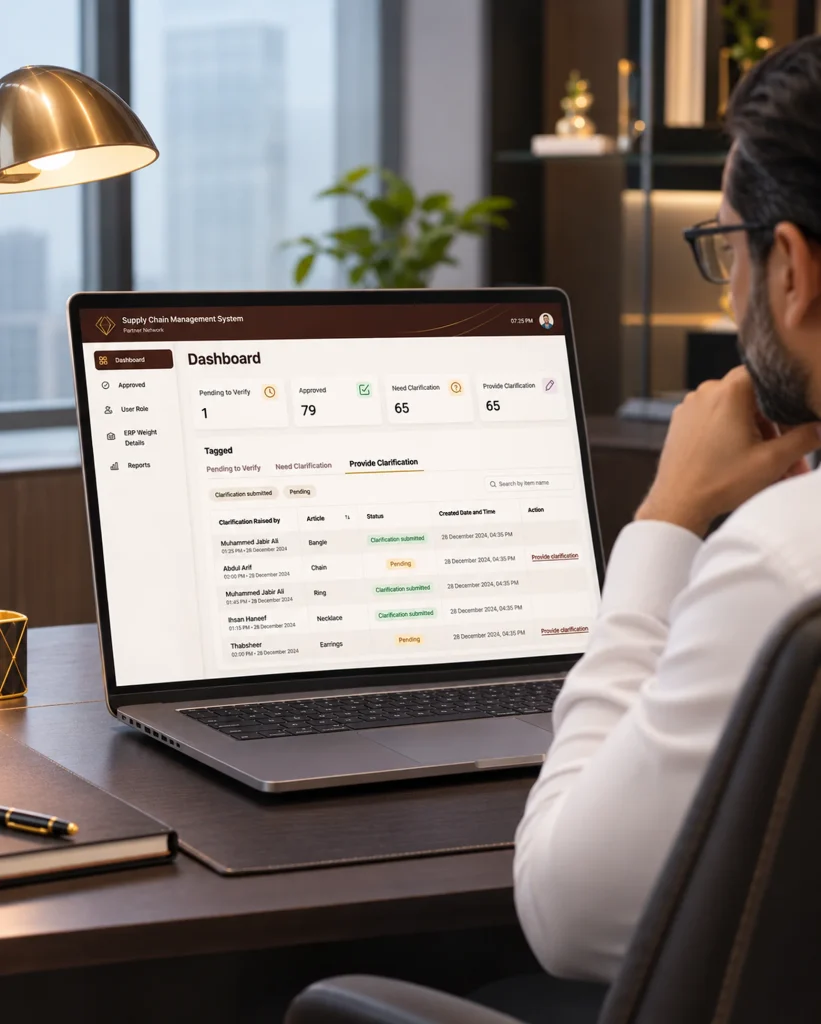
Figure 3 : Administration portal dashboard displaying central controls and Microsoft Dynamics AX ERP integration features.
Our scalable high-performance architecture utilizes Flutter and PHP Laravel to handle the rigorous demands of multi-platform inventory audit applications and business logic. Supported by Microsoft SQL Server and Azure Blob Storage, this tech stack ensures secure transactional data management, real-time photograph logging, and seamless backend integration.
| Strategic Component | Core Technology | Business Purpose |
|---|---|---|
| Mobile Front-End | Flutter | Cross-platform Android and iOS inventory audit app. |
| Backend Framework | PHP Laravel | Business rules, calculations, approval routing, API services. |
| Database Engine | MS SQL Server | Stores inventory, audit, and transactional records. |
| File storage | Azure Blob Storage | Stores audit photographs and document logs. |
| Hosting | Azure Virtual Machines | Hosts application services. |
| ERP integration | Custom API layer; Microsoft Dynamics AX | Exchanges inventory and audit data with the ERP. |
ARCHITECTURE OVERVIEW
The solution combines Flutter mobile apps with a Laravel web and backend layer hosted on Azure Virtual Machines. Microsoft SQL Server stores application and inventory records, while Azure Blob Storage holds audit photographs and document logs. A custom API integration layer connects the platform with Microsoft Dynamics AX, supporting the exchange of inventory and audit information.
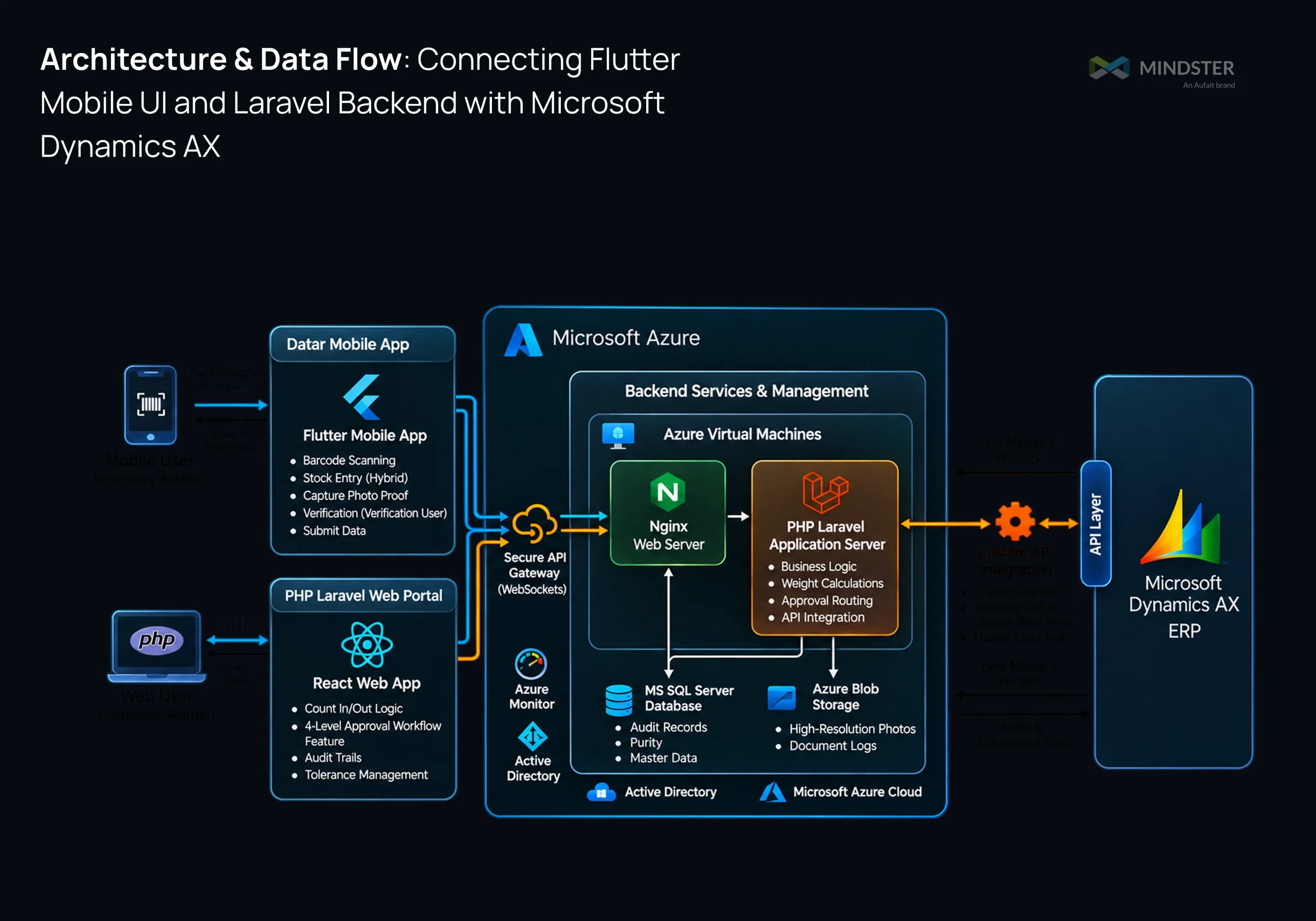
Figure 4 : System architecture diagram illustrating data integration across the mobile frontend, web portal, Azure cloud infrastructure, and core ERP system.
RESULTS & MEASURABLE IMPACT
The digital inventory audit workflow reduced the time required for a standard stock-taking cycle and brought counting, review and ERP data exchange into a more connected process. The following operational improvements were observed through the use of our application.
The reported standard stock-taking cycle fell from four hours to 30 minutes, allowing the team to complete the audit process more quickly. This is an 87.5% reduction based on the before-and-after calculations.
Automated weight and purity calculations, together with a defined workflow for untagged items, reduced the need for staff to perform these calculations manually during stock-taking.
The four-level digital approval chain replaced physical document hand-offs with routed reviews. Approval cycles that previously took days could be completed in minutes.
The integration with Microsoft Dynamics AX supports the exchange of inventory and audit data between the mobile/web workflow and the ERP, helping reduce delays between floor-level counting and back-office reconciliation.
Digital audit records, user-action logs, and captured photo evidence give reviewers more context when validating stock entries and investigating discrepancies.
If manual stock-taking, multi-level approvals or delayed ERP updates is slowing down your operations, Mindster can help digitize inventory workflows across mobile, web and enterprise systems.
CLIENT SUCCESS STORIES
Malabar Gold & Diamonds Automated Retail Packaging Logistics is an enterprise-grade platform built on Flutter and PHP Laravel…
 Jewelry
Integrated ERP systems and mobile apps automate fulfillment and eliminate manual handovers.
 Jewelry
LATEST BLOG
FAQ'S
Jewelry inventory audit software can streamline stock-taking through mobile barcode scanning, automated calculations, digital stock entry, and approval of workflows. For items that require weight-based calculations or additional classification, system-driven processing can reduce repetitive manual work. Aufait's stock audit mobile app used Flutter-based barcode scanning, digital stock entry, automated weight and purity calculations, and a routed approval workflow to reduce the stock-taking duration from four hours to 30 minutes for a large jewelry retailer chain.
A four-level digital inventory approval of workflow routes submitted stock entries through the required sequence of reviewers using a web portal. Reviewers can validate counts and discrepancies before entries progress, while recorded user actions provide a clearer audit history. In this solution, the workflow is implemented within a PHP Laravel application and is intended to reduce delays caused by physical document routing without removing the required approval stages.
A custom API integration layer can connect an inventory audit application with Microsoft Dynamics AX, supporting the exchange of inventory and audit data between the mobile/web workflow and the ERP. This helps reduce duplicate handling and the delay between physical stock counts and updates to digital inventory records. Aufait's application uses a PHP Laravel backend, with Microsoft SQL Server and Azure services supporting application data and audit evidence.
Jewelry retailers should evaluate whether an inventory audit solution supports mobile stock-taking, barcode scanning, untagged-item handling, weight-based calculations, configurable discrepancy thresholds, multi-level approvals, and integration with their existing ERP. Centralized administration, digital audit trails, and support for store-level inventory workflows are also important. For businesses using Microsoft Dynamics AX, API-based integration can help connect physical inventory verification with the existing ERP environment.
Daily inventory auditing helps jewelry retailers maintain accurate stock records, identify discrepancies between physical and system inventory, and improve accountability for high-value items. Regular verification of jewelry quantities, weights, purity categories, and stock movements help retailers detect errors earlier and keep inventory records aligned with their ERP system.
Inventory audit software can provide a dedicated stock-entry path for untagged items, associating physical counts with available system records instead of relying only on barcode scans. In this solution, count-in/count-out handling and automated weight and purity calculations support more consistent processing of these items. The workflow is designed for retail audits where not every item can be identified through a barcode.
Untagged jewelry items can be challenging to audit because they cannot be identified through standard barcode scanning alone. A digital inventory audit application can provide a separate stock-entry workflow for these items, use available inventory master data to support identification, and automate configured weight or purity calculations. Verification rules and approval of workflows help ensure that exceptions are reviewed before inventory records are finalized.
The solution uses Flutter for the Android and iOS mobile applications, PHP Laravel for backend business logic and the web portal, Microsoft SQL Server for application and inventory records, and Azure Virtual Machines to host the application services. Azure Blob Storage is used for auditing photographs and document logs. A custom API layer connects the workflow with Microsoft Dynamics AX, while the mobile app supports barcode scanning and photo capture.
Get In Touch