
Happy Habits gave me the chance to solve a problem I felt as a parent long before I thought of it as a product: how do you turn screen time into something worth having, instead of something to feel guilty about? Building it reinforced a belief I already held as an engineer, that the products children use deserve the same rigor as any enterprise platform, especially when it comes to privacy and trust. It was also a reminder that AI tools can move fast, but the judgment behind them is still what makes a product something people can rely on.
As a solution architect and a parent, I’ve always paid close attention to what my kids are doing during their screen time.
Let’s be honest, in 2026, keeping kids away from screens entirely just isn’t realistic. So instead of fighting that battle, I started asking a different question, how do I build a positive, consistent daily routine around it?
That question kept nagging at me. I didn’t want screen time to just be passive scrolling or random games. I wanted it to mean something. I wanted my kids’ “app time” to actually be worth it.
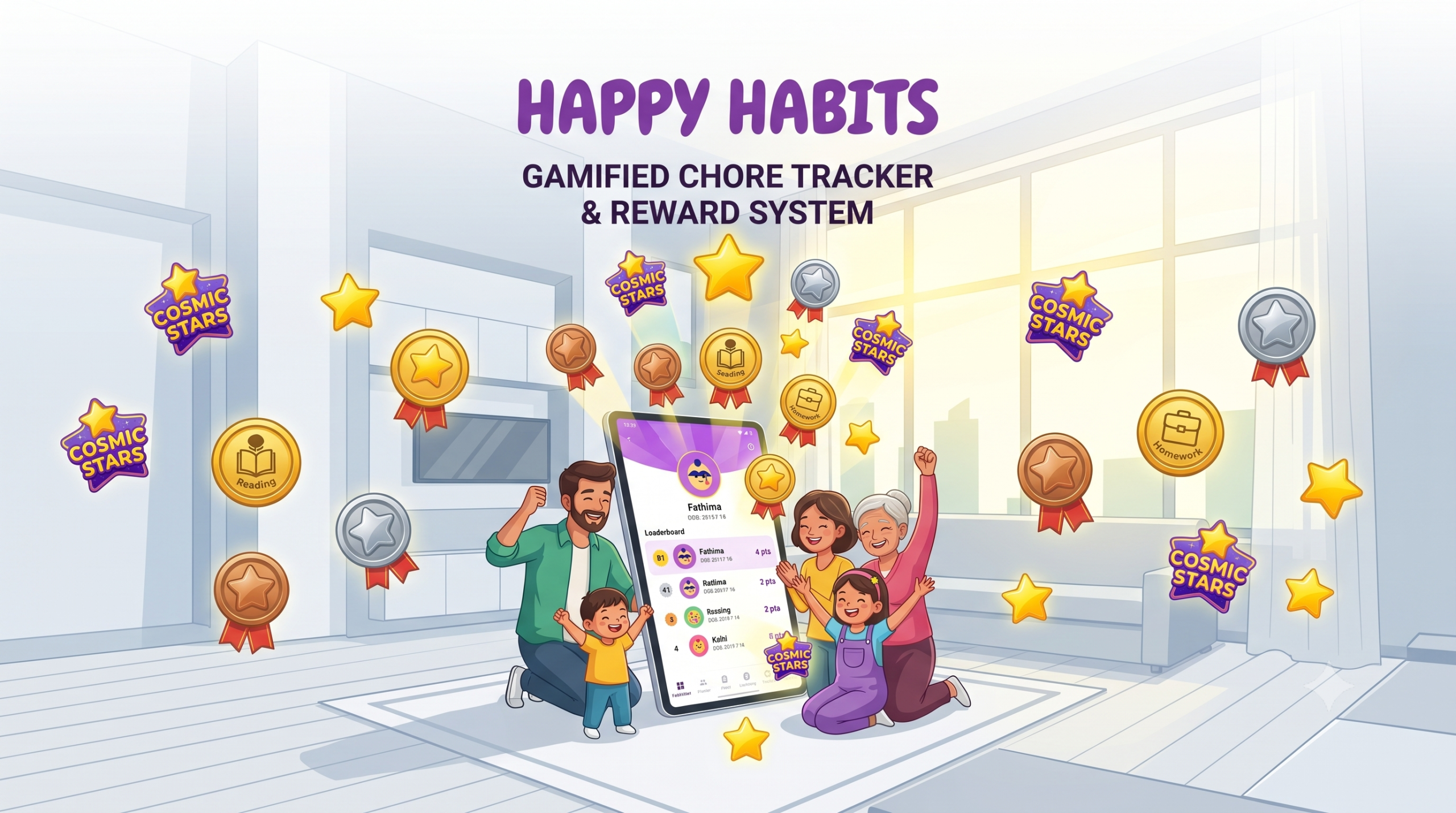
That challenge is what led us to build Happy Habits, a vibrant, gamified chore tracker for kids, complete with a star-point reward system and a visual leaderboard, for Android.
It started as a personal project, entirely separate from my day-to-day work, but building it, I couldn’t help but bring the same product thinking and architectural rigor to it that goes into any serious platform.
How Happy Habits Works: Designing Gamified UI/UX for Kids’ Apps
Most chore apps out there feel like a to-do list wearing a costume, functional, sure, but there’s nothing in them that makes a kid actually want to open it.
When I started building Happy Habits, I kept coming back to one question, what if the app itself was the reward, not just a checkbox at the end of it?
That single shift in thinking ended up shaping every decision that followed.
Here’s what that looks like in practice:
- Stars that actually mean something: Instead of a flat “task done” tick, kids earn Bronze, Silver, Gold, and even Cosmic stars, each carrying its own point value. It’s a simple mechanic, but it turns finishing a task into something worth celebrating instead of something worth avoiding.
- A profile that’s theirs: Kids choose their own cartoon avatar and can change it anytime. It’s a small feature, but it does something important: it gives them a sense of ownership over their own space in the app. In product terms, this is the same principle that makes any platform sticky. People invest more in things they feel are personally theirs.
- A leaderboard that’s about fun, not pressure: Progress updates live, turning everyday chores, like brushing teeth or tidying a room, into a friendly little competition rather than a nagging reminder. The line between “motivating” and “stressful” is thin, especially with kids, and I was careful not to build something that quietly teaches them to tie their self-worth to a score.
- A parent’s side that stays in parents’ hands: Behind a PIN-locked dashboard, I can verify chores, award stars, and adjust settings, so the reward system stays fair and consistent, without a child accidentally editing their own point balance. It’s a small detail, but it reflects something I care about in any product I build, trust and control need to sit with the right person by design, not as an afterthought.
Visually, I leaned into a Material Design 3-inspired interface: clean layouts, generous white space, friendly typography.
I wanted Happy Habits to feel less like an admin tool bolted onto a kid’s phone, and more like a toy they genuinely enjoy opening. That’s a design philosophy that applies well beyond apps for kids.
The best products, for any audience, disappear into the experience instead of announcing themselves as software.
Have a Product Idea for Kids or Families?
Building for children requires the same engineering rigor as an enterprise platform. Partner with our team to bring your app to life with speed, secure architecture, and thoughtful UX.
Book a ConsultationBuilding an Offline-First, COPPA-Compliant Privacy Architecture
Parents today are, rightly, more cautious about data privacy than ever, especially when it comes to anything involving their kids. That concern shaped one of the earliest decisions I made with Happy Habits, it had to be offline-first.
Every piece of data, from profile pictures to chore completions, stays locally on the device. No mandatory cloud login, no tracking scripts, no external servers quietly collecting information in the background.
But offline-first creates its own problem.
If a mother, father, and child are all using different phones or tablets, how do they stay in sync without a central server holding everything together?
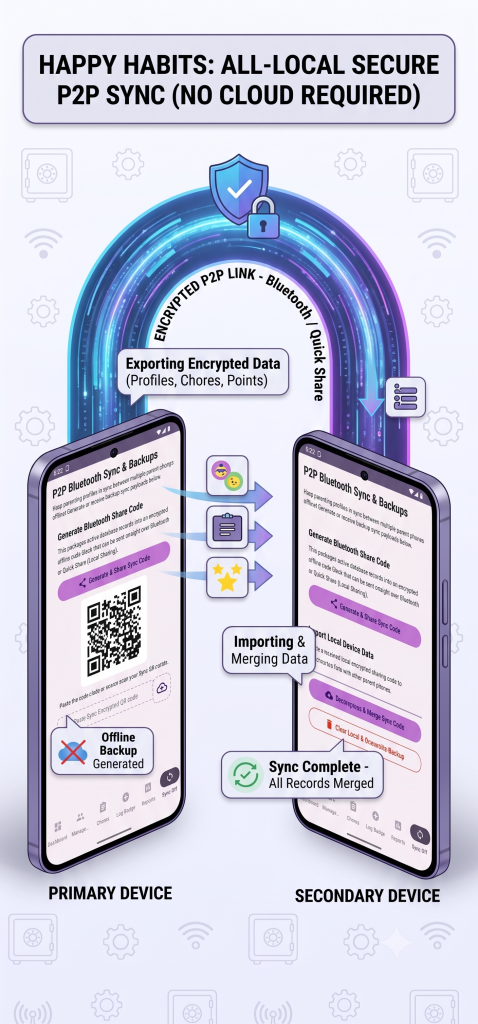
I solved this with a local, secure peer-to-peer backup and sync system. Parents can export their data into a lightweight, encrypted sync code, something that can be copied, sent over message, or scanned as a QR code to move the state to another device almost instantly.
To make this genuinely usable day-to-day, I built two modes of syncing:
Smart Merge: Safely combines backup data without creating duplicate kids or chores.
Clear & Overwrite: For setting up a brand-new device with a clean, exact mirror of the master backup. Because this can permanently erase existing data, it sits behind a clear visual confirmation screen, so nothing gets wiped by accident.
If you’re building anything for families, especially anything involving children, this is worth internalizing early, privacy can’t be a feature you bolt on later.
It has to shape the architecture from day one, or you end up retrofitting trust after the fact, which is a much harder sell to parents.
AI-Assisted Mobile App Development: Accelerating Delivery Without Sacrificing Quality
Traditionally, building something this secure and fully-featured would have meant months of engineering and multiple design cycles just to get to a first working version.
Using Google AI Studio changed that for me, not by replacing the engineering judgment a product like this needs, but by speeding up how quickly that judgment could be turned into working software.
Co-coding with AI meant I could move from a rough idea to a genuinely polished, working product far faster than I expected, without cutting corners on the decisions that actually matter.
It taught me a few things I think apply to anyone building a product today, especially in the kids’ or education space:
- Prototyping got faster, not easier:
Complex pieces, like the peer-to-peer backup engine, went from something I’d expect to spend weeks on, to something I could iterate on in hours. But every iteration still needed a decision from me on what was actually production-worthy versus what just looked done.
- Visual polish improved, with direction:
AI-assisted tooling helped me apply modern styling practices quickly, things like keeping text readable against colorful kid avatars for accessibility, or getting screens to sit edge-to-edge cleanly across device sizes. The tooling suggested the pattern; deciding which patterns were right for a children’s product, and where to override the default, was still on me.
- Quality checks got faster to run, not lighter to skip:
Compilation checks built into the workspace surfaced code conflicts immediately, which meant less time hunting for bugs. But every flagged issue still went through the same review I’d apply to any production system, especially one handling a family’s data.
For anyone building a product, that’s the real shift.
AI makes execution faster, but the results are only as good as the experience guiding it. That’s the real value of building with the right team, quick to test and iterate, without gambling on what actually matters, security, architecture, and whether it holds up once real people use it.
Have an Idea for a Kids’, Family, or Habit-Building App?
Building Happy Habits reinforced something I already believed, great products for children need the same rigor as any enterprise platform, secure architecture, thoughtful UX, and a development process built for speed without cutting corners.
It’s the same thinking Mindster has applied at a larger scale, for instance, with Montekids, a global early-learning platform for children aged 3 to 5, where our team built a zero-literacy, audio-visual interface for kids alongside a secure, OTP-verified “Parental Gate” for parents, resulting in a 25% lift in trial-to-paid conversions.
If you’re looking for an experienced kids’ app development company to build a COPPA-compliant educational app or habit tracker, Mindster’s team can turn your concept into a secure, market-ready product.

A software architect and engineer with 16 years of experience, specializing in cloud infrastructure, backend development, and applied AI solutions. Dedicated to pushing the boundaries of AI architecture and modern data engineering, they focus on designing scalable, intelligent applications that solve complex enterprise challenges.