
Flutter’s Dart ecosystem often lacks the specialized libraries required for advanced machine learning, signal processing, and scientific computing. While cloud-based APIs can bridge this gap, they introduce latency, require persistent connectivity, and complicate data privacy compliance. For high-performance “edge” applications, running a native Python environment on-device is the only viable alternative.
This report outlines a tripartite architecture—connecting a Flutter UI, a Kotlin-native Android host, and an embedded CPython runtime. By leveraging Chaquopy and Flutter Method Channels, developers can execute Python’s scientific stack (NumPy, SciPy, scikit-learn) directly within the Android process without sacrificing UI fluidity.
Why Python on Android: Strategic and Technical Imperatives
Integrating a Python runtime into a Flutter-based Android app preserves existing IP and leverages Python’s scientific computing ecosystem. Manually porting complex signal processing or NLP pipelines to Dart or Kotlin is cost-prohibitive and risks logic errors.
While TensorFlow Lite handles neural network inference, deploying non-neural ML models (scikit-learn, Pandas) on-edge requires a native Python runtime. This hybrid architecture eliminates cloud latency, ensures data privacy by keeping processing on-device, and enables offline functionality.
To solve the performance gap of pure Python frameworks like Kivy, this approach uses Flutter for 60 FPS UI and Kotlin for platform services, while reserving Python for computationally intensive tasks handled by pre-compiled C-extensions like NumPy.
What is Chaquopy?
Chaquopy is a production-ready Python SDK for Android that embeds a CPython interpreter directly into applications. It eliminates the need for manual C/C++ bindings or Java Native Interface (JNI) overhead by abstracting the Android Native Development Kit (NDK) toolchain.
Through a specialized Gradle plugin, Chaquopy automates the integration of pre-compiled CPython binaries and manages the installation of third-party packages via pip. To bypass the lack of local C compilers in Android environments, Chaquopy provides a dedicated repository of native wheels built for ARM architectures. This enables the direct installation of computationally heavy libraries like OpenCV or SciPy without requiring complex local build configurations.
Architecture Overview
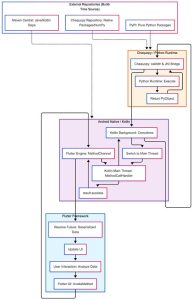
Integrating Python functionality into a Flutter application through Kotlin involves a complex communication model spanning multiple processes and languages. This architecture is structured across three separate execution environments, each with specialized roles during the application’s lifecycle:
- The Flutter UI Context (Dart): This layer operates on the Flutter Engine’s UI thread. It is responsible for rendering the visual hierarchy, capturing user input, managing application state, and dispatching asynchronous requests to the native platform via Platform Channels.
- The Native Host Context (Kotlin): This layer operates within the Android Runtime (ART). It acts as the orchestration and bridging layer, utilizing the Flutter MethodChannel API to receive incoming Dart messages. Crucially, it leverages Kotlin Coroutines to offload heavy processing to background thread pools, ensuring the UI thread remains unblocked.
- The Embedded Interpreter Context (Python): This layer operates within the CPython runtime that Chaquopy instantiates. It executes the mathematical algorithms or business logic and marshals the results back to the Kotlin layer through Chaquopy’s internal JNI implementations.
Strictly defined serialization and deserialization boundaries achieve seamless interaction. The process involves the Flutter Engine serializing Dart objects into standard message codecs. These are then deserialized into Java/Kotlin primitives. Chaquopy uses JNI to translate these primitives into PyObject references, which are finally consumed as standard Python objects. The computed results are returned to the user interface by following the exact reverse of this path.
Project Setup & Configuration
Integrating Chaquopy into an Android host requires precise configuration of the Gradle build system. The modern standard for Android development uses the Kotlin Domain-Specific Language (DSL) for Gradle (build.gradle.kts), which offers superior type safety, IDE autocompletion, and compile-time error checking compared to the legacy Groovy DSL (build.gradle).
Top-Level Gradle Configuration
The integration begins in the project’s root directory. The settings.gradle.kts file must include mavenCentral() within its pluginManagement repositories, as Chaquopy’s artifacts and plugin dependencies are distributed globally through Maven. Subsequently, the Chaquopy plugin is declared in the top-level build.gradle.kts file. It is critical to ensure compatibility with the Android Gradle Plugin (AGP). As of Chaquopy version 17.0.0, the supported AGP versions span from 7.3.x to 9.1.x. Older AGP versions (such as 7.0 to 7.2) are explicitly unsupported by the latest releases.
Kotlin DSL
plugins {
id(“com.chaquo.python”) version “17.0.0” apply false
}
Module-Level Configuration and ABI Filters
Within the Android application module (typically app/build.gradle.kts), the Chaquopy plugin is applied alongside the standard Android application plugin. A critical architectural decision at this stage involves Application Binary Interface (ABI) filtering.
Because the embedded Python interpreter is a native C binary, it must be compiled for the specific CPU architectures of the target Android devices. Including binaries for all possible architectures leads to unacceptable Application Package (APK) bloat. Therefore, the abiFilters directive must be employed to restrict compilation exclusively to necessary architectures. For modern deployment, arm64-v8a covers virtually all contemporary Android hardware, while x86_64 is required for execution on standard Android emulators. Older 32-bit architectures (armeabi-v7a and x86) are increasingly obsolete. While still technically buildable, they are entirely unsupported for the 16 KB page alignment required by Android 15. For modern compliance, Python 3.13+ on 64-bit architectures is the mandatory standard.
Kotlin DSL
android {
defaultConfig {
ndk {
abiFilters += listOf(“arm64-v8a”, “x86_64”)
}
}
}
The Chaquopy DSL Block and Pip Dependencies
The module-level build file also houses the Chaquopy DSL block, which governs the parameters of the Python runtime environment. While older versions of Chaquopy defaulted to Python 3.8, Chaquopy 17.0.0 defaults to Python 3.10 and provides support up to Python 3.14. Explicitly defining a more recent version, such as Python 3.13, ensures access to the latest language features and CPython performance enhancements.
Third-party Python libraries are declared within the pip sub-block. Chaquopy intercepts these directives and installs the libraries during the Gradle sync phase. It is highly recommended to pin package versions (e.g., install(“scipy==1.10.1”)) to guarantee deterministic builds. Chaquopy automatically routes these installation requests to its customized repository for pre-compiled Android wheels.
Kotlin DSL
chaquopy {
defaultConfig {
version = “3.13”
pip {
install(“numpy”)
install(“scikit-learn”)
// A requirements.txt file can also be referenced
// install(“-r”, “requirements.txt”)
}
}
}
Android 15 and 16 KB Page Size Alignment
A critical technical mandate introduced with Android 15 (API Level 35) is the requirement for 16 KB memory page alignment. Historically, the Android operating system and its underlying Linux kernel utilized 4 KB memory pages. As device manufacturers equip hardware with more physical RAM, using larger memory pages optimizes system memory performance. Implementing 16 KB page sizes yields overall system performance boosts of 5-10%, lowers app launch times by over 3% on average under memory pressure, and reduces power draw during application execution.
Consequently, any application that uses native code, which explicitly includes the CPython interpreter embedded by Chaquopy and all native Python wheels (such as NumPy), must ensure its Executable and Linkable Format (ELF) segments are aligned to 16 KB boundaries. Native libraries linked with legacy 4 KB alignment will fail to load dynamically on devices running a 16 KB kernel, causing fatal runtime crashes characterized by dlopen failed exceptions.
To meet Google Play’s 16 KB page size requirement for Android 15 (effective November 1, 2025), developers using Chaquopy must upgrade to version 17.0.0 and must use Python 3.13 or newer. Using older Python versions (3.12 or below) will deploy incompatible native “.so” files, violating Android 15 requirements and causing app crashes, as existing Android wheels built before October 2024 lack 16 KB compatibility.
Python Initialization and Lifecycle Management
The CPython interpreter must be initialized within the Android process memory before any Python business logic can run. This necessary initialization process involves a computational cost, so its placement within the application’s lifecycle must be carefully considered.
There are two primary initialization strategies:
- Lazy (On-Demand) Initialization: The interpreter is started only when the user navigates to a Flutter screen that specifically requires Python processing. This minimizes the initial cold-start time of the Flutter application, conserving CPU cycles during the critical app launch phase.
Kotlin
if (!Python.isStarted()) {
Python.start(AndroidPlatform(context))
}
- Eager (Always-On) Initialization: The interpreter boots alongside the Android application. This is implemented by declaring com.chaquo.python.android.PyApplication (or a custom subclass) as the application name in the AndroidManifest.xml. This ensures Python.start() runs immediately inside Application.onCreate(). While this strategy increases the initial launch time of the app, it guarantees zero latency when Python is first invoked by the user.
Since Flutter applications already have the overhead of initializing their own Flutter Engine, Lazy Initialization is generally preferred. This approach is only abandoned if the immediate launch experience is critically dependent on Python functionality.
The Kotlin Method Channel Bridge
The core bridging mechanism between the Dart UI and the embedded Python backend is the Flutter MethodChannel. This channel acts as an asynchronous, bidirectional Remote Procedure Call (RPC) mechanism. Messages are serialized into a binary format, passed across the JNI boundary by the Flutter Engine, and delivered to the Android native host.
Setting up the Method Call Handler
Within the MainActivity.kt file (which must extend FlutterActivity), the configureFlutterEngine method is overridden. A MethodChannel is instantiated with a unique string identifier matching the Dart implementation.
Kotlin
import io.flutter.embedding.android.FlutterActivity
import io.flutter.embedding.engine.FlutterEngine
import io.flutter.plugin.common.MethodChannel
import com.chaquo.python.Python
import com.chaquo.python.PyException
class MainActivity: FlutterActivity() {
private val CHANNEL = “com.akdev.app/python_bridge”
override fun configureFlutterEngine(flutterEngine: FlutterEngine) {
super.configureFlutterEngine(flutterEngine)
val channel = MethodChannel(flutterEngine.dartExecutor.binaryMessenger, CHANNEL)
channel.setMethodCallHandler { call, result ->
when (call.method) {
“processData” -> {
// Logic to handle Python execution
}
else -> result.notImplemented()
}
}
}
}
Threading Architecture and Kotlin Coroutines
Executing computationally intensive tasks on a mobile platform’s main UI thread is a significant anti-pattern in cross-platform development. In the context of Android, the default behavior is for the MethodCallHandler to be invoked on this main thread. If a tool like Chaquopy is used directly within this handler, the CPython script’s execution will synchronously block the Android main thread. Since Flutter applications aim for a smooth rendering rate of 60 to 120 frames per second, this blockage immediately results in dropped frames, UI freezes, and carries the risk of triggering an OS-level Application Not Responding (ANR) crash.
To maintain a fluid user experience, the native Kotlin code must offload the Python execution to a background thread pool. Kotlin Coroutines provide an elegant, lightweight concurrency framework for this exact purpose.
The execution is wrapped in a CoroutineScope utilizing Dispatchers.Default (ideal for CPU-bound tasks like machine learning or data parsing) or Dispatchers.IO. Once the Python logic resolves, the execution context must be explicitly switched back to the main thread (Dispatchers.Main) before returning the result to the Flutter MethodChannel.Result object. The Flutter framework mandates that all channel responses be invoked strictly on the main thread.
Kotlin
channel.setMethodCallHandler { call, result ->
if (call.method == “runMachineLearningModel”) {
val inputData = call.argument<String>(“data”)?: “”
// Dispatch to a background thread for heavy computation
CoroutineScope(Dispatchers.Default).launch {
try {
val py = Python.getInstance()
val module = py.getModule(“model_inference”)
// Execute Python code
val pyResult = module.callAttr(“predict”, inputData)
val finalOutput = pyResult.toString()
// Switch back to the Main thread for the Flutter callback
withContext(Dispatchers.Main) {
result.success(finalOutput)
}
} catch (e: PyException) {
withContext(Dispatchers.Main) {
result.error(“PYTHON_ERROR”, e.message, null)
}
}
}
}
}
The Python Side (Business Logic)
The Python scripts that contain the core business logic are placed in the app/src/main/python/ directory of the Android project. During the Gradle build phase, Chaquopy packages these scripts into the APK’s assets, ensuring they are securely available to the embedded runtime at execution.
A Python module acts as the entry point. The architecture promotes stateless functions to avoid the complexities of managing object lifecycles and memory garbage collection across the JNI boundary.
Python
# app/src/main/python/model_inference.py
import numpy as np
import json
def predict(input_json: str) -> str:
“””
Parses JSON data, converts it to a NumPy array,
and performs a basic statistical or ML operation.
“””
try:
# Deserialize the incoming string payload
data_dict = json.loads(input_json)
# Convert complex lists to optimized native arrays
matrix = np.array(data_dict[‘features’], dtype=np.float32)
# Example operation: calculating column-wise means
means = np.mean(matrix, axis=0)
# Convert NumPy array to a standard Python list for JSON compatibility
return json.dumps({
“status”: “success”,
“predictions”: means.tolist()
})
except Exception as e:
return json.dumps({“status”: “error”, “message”: str(e)})
The Dart / Flutter Side
On the frontend, Dart encapsulates the MethodChannel communication within an asynchronous service layer. This ensures the presentation and UI layers remain clean and decoupled from platform-specific invocation logic.
The invokeMethod function is utilized to send data across the bridge. Because this operation crosses the Dart-to-Kotlin boundary and the Kotlin-to-Python boundary, executes the logic, and returns through both boundaries, it is inherently asynchronous and returns a Dart Future. Proper try-catch blocks must be employed to handle PlatformException instances, which map directly to errors caught and returned by the Kotlin layer.
Dart
import ‘package:flutter/services.dart’;
import ‘dart:convert’;
class PythonInferenceService {
static const MethodChannel _channel = MethodChannel(‘com.akdev.app/python_bridge’);
Future<Map<String, dynamic>> executeInference(List<List<double>> features) async {
try {
// Serialize complex data to JSON string for the bridge
final String payload = jsonEncode({‘features’: features});
// Invoke the native channel and await the asynchronous response
final String resultString =
await _channel.invokeMethod(‘runMachineLearningModel’, {‘data’: payload});
// Parse the return payload
return jsonDecode(resultString);
} on PlatformException catch (e) {
throw Exception(“Inference Engine Failure: ${e.message}“);
}
}
}
Data Flow: A Sequence Perspective
To fully conceptualize the execution pipeline, the following sequence dictates the data flow from user interaction to Python inference and back. Understanding this sequence is vital for identifying performance bottlenecks and debugging points of failure:
Advanced: Data Marshalling (Beyond Strings)
The performance and reliability of the architecture hinge heavily on how data is marshaled across the two translation boundaries (Dart -> Kotlin and Kotlin -> Python). Inefficient data marshalling can easily erase the performance gains achieved by offloading calculations to Python.
Primitive Type Mapping
Chaquopy features an automated type conversion system between Java/Kotlin and Python. The mapping behaves predictably for scalar values, but developers must be aware of how overload resolution functions to avoid OverflowError crashes.
| Java/Kotlin Type | Python Equivalent | Auto-boxing Support | Resolution Rules |
| null | None | N/A | Exact equivalent. |
| boolean | bool | Yes | Transparent conversion. |
| int, long | int | Yes | Overload resolution favors the longest type if ambiguous. |
| float, double | float | Yes | Transparent conversion. |
| String, char | str | N/A | Characters map to 1-length strings; String is preferred. |
When a Python object is returned to Kotlin, it manifests as a PyObject. The developer must explicitly cast it back to a Kotlin type using methods such as .toString(), .toInt(), or .toJava(IntArray::class.java) before returning the data to Flutter. To explicitly enforce a Java primitive type from Python, Chaquopy provides wrapper classes such as java.jint and java.jboolean. These wrappers include a truncate parameter; if set to True, excess high-order bits are discarded (mimicking a Java cast), whereas the default False behavior raises an OverflowError if the value is out of range.
Object and Array Marshalling
Beyond primitives, Java objects are exposed to Python as jclass objects, preserving their run-time types and allowing Python to invoke Java methods (e.g., toString(), hashCode()) directly using standard Python syntax.
When handling arrays, any Python sequence (except strings) passed to a Java method is automatically copied into a new Java array, represented in Python as a jarray. A highly optimized and critical feature of Chaquopy is its support for the Python Buffer Protocol. Java primitive arrays (like int or float) implement this protocol, allowing them to be directly converted into NumPy arrays (e.g., numpy.array(java_array)). This bypasses the need for an expensive element-by-element iteration in Python memory, enabling true zero-copy (or near-zero-copy) performance when transferring large matrices.
Handling Complex Dictionaries and Maps
A common architectural pitfall arises when attempting to pass complex nested objects between the environments. While Flutter easily converts a Dart Map<String, dynamic> to a Kotlin HashMap<String, Any>, passing a Java Map directly into a Python function expecting a Python dict does not occur automatically. The Java Map is passed across the JNI as a jclass object representing the Java map, which lacks standard Python dictionary protocols. While one could call Java .get() methods from Python, it is highly inefficient.
Best Practice: To marshal complex nested data (e.g., configurations, datasets, structured payloads), the universally accepted pattern is JSON serialization.
- Serialize the Dart Map to a JSON String.
- Pass the String via MethodChannel to Kotlin.
- Pass the String to Python.
- Call json.loads(payload) in Python to generate a native, deeply nested Python dict.
This strategy avoids deep recursive JNI boundary crossings, which are computationally expensive, relying instead on a single, fast string transfer and highly optimized native JSON parsers on both ends.
Image and Byte Array Marshalling
Applications involving computer vision (e.g., integrating an OpenCV pipeline) require passing raw image data from Flutter to Python. Serializing multi-megabyte images to Base64 strings introduces massive memory overhead and serialization latency, often crashing the application with Out Of Memory (OOM) errors.
Best Practice: Pass raw byte arrays. Flutter’s Uint8List maps directly to Kotlin’s ByteArray. When passed to Python, Chaquopy translates this ByteArray efficiently.
It must be noted that converting Python bytes or bytearray objects to Java byte arrays invokes a strict unsigned-to-signed conversion logic. Python values 128 through 255 are mapped to Java values -128 through -1. Returning processed images to Flutter involves returning a Python bytes object, which is received in Kotlin as a PyObject.
Calling pyObject.toJava(ByteArray::class.java) retrieves the raw bytes for the Flutter UI to render via Image.memory().
Debugging & Logging
Debugging across three disparate language runtimes requires a systematic approach. Errors occurring deep within the Python execution context do not natively format themselves well for Dart console outputs, often leading to opaque crashes.
Chaquopy solves this by seamlessly redirecting Python’s standard output (sys.stdout) and standard error (sys.stderr) streams to the Android Logcat system, tagging them as python.stdout and python.stderr respectively. This enables developers to use native Python print() statements and view the output directly in Android Studio’s Logcat panel, facilitating rapid debugging of the Python logic without needing to pipe strings back to the Flutter UI.
When a fatal error occurs in the Python execution context, Chaquopy throws a PyException within the Kotlin layer. By encapsulating the module.callAttr(…) block within a try/catch (e: PyException) block, Kotlin can capture the exact Python traceback. This trace can then be parsed and sent back to Flutter via the MethodChannel.Result.error() method, ensuring the Dart layer receives meaningful debugging contexts rather than generic platform crashes.
Common runtime errors include ModuleNotFoundError (indicating a missing pip installation in the Gradle configuration) and FileNotFoundError (typically related to incorrect path resolution for assets, which should be resolved relative to the __file__ variable of the running script rather than hardcoded absolute paths).
Optimization: ProGuard, R8, and ABI Splits
Deploying a production application requires stringent optimization protocols to minimize binary size, enhance execution speed, and obfuscate proprietary logic. The modern Android build system relies on the R8 compiler for code shrinking, minification, and optimization, which has entirely replaced the legacy ProGuard tool.
R8 Configuration and Keep Rules
When isMinifyEnabled = true and isShrinkResources = true are declared in the release build type, R8 performs aggressive “tree shaking” to remove unreachable code. Because R8 utilizes static analysis, it constructs a dependency graph of all direct method calls.
This presents a critical vulnerability for Chaquopy and Flutter MethodChannels. The invocation of Python modules from Kotlin via callAttr() and the retrieval of Kotlin classes from Python rely entirely on the Java Native Interface (JNI) and dynamic reflection. R8’s static analysis cannot predict these dynamic string-based lookups. Consequently, R8 will assume the targeted Kotlin classes and methods are unused and will either strip them from the binary or aggressively rename them (obfuscation), leading to fatal ClassNotFoundException or NoSuchMethodException crashes at runtime.
To prevent this, precise “Keep Rules” must be authored in the proguard-rules.pro file. Developers must also ensure they are using proguard-android-optimize.txt as the default ruleset, as the legacy proguard-android.txt is deprecated and actively disables modern R8 optimizations.
| Keep Option | Functional Description | Use Case in Chaquopy Integration |
| -keep | Prevents the class and specified members from being removed or renamed.
In addition to custom data models, the following rule is mandatory to protect the Chaquopy internal JNI bridge: -keep class com.chaquo.python.** { *; } |
Core data structures passed between Python and Kotlin. |
| -keepclassmembers | Prevents specified members from being altered, but allows the class to be removed if completely unreferenced. | Protecting specific Kotlin callback methods invoked by Python scripts. |
| -keepattributes | Preserves metadata like signatures and annotations. | Required if passing complex JSON deserialization models (like Gson/Moshi) across the bridge. |
Best Practice: Write narrow, targeted keep rules. Instead of keeping an entire package (e.g., -keep class com.akdev.app.** { *; }), which drastically reduces R8’s optimization capabilities, explicitly target only the data models and bridge interface classes interacting with the Python layer.
Managing APK Size through ABI Filtering
A major issue with embedding CPython is the resulting increase in the Application Package (APK) size. This is because each included Application Binary Interface (ABI) contributes several megabytes for the Python interpreter itself, in addition to the size of any compiled native packages, such as NumPy.
To optimize deployment, developers generally utilize Android App Bundles (AABs). However, because Chaquopy packages its native components uniquely, standard APK splits provide limited benefits. The official recommendation is to employ “Product Flavor Dimensions” to strictly filter ABIs. By setting abiFilters += listOf(“arm64-v8a”) for production builds, developers exclude the unnecessary x86 and x86_64 emulators binaries from the final payload, resulting in a substantially leaner footprint suitable for the Google Play Store. Furthermore, replacing heavy libraries like standard TensorFlow with tflite-runtime via pip dramatically trims the overall footprint without sacrificing inference capability.
Efficiency & Performance Analysis
Understanding the performance profile of this architecture dictates its appropriate application use cases.
Startup Metrics: Cold vs. Hot Starts
Application startup times are generally categorized into Cold, Warm, and Hot starts. Cold starts, where the application is instantiated from scratch by the OS, incur the highest latency and present the greatest challenge to minimizing startup time. Two critical metrics are Time to Initial Display (TTID) and Time to Fully Drawn (TTFD).
Embedding Chaquopy introduces a noticeable delay during the Cold Start phase, specifically when Python.start() is invoked. During this initialization, the Python runtime must extract standard library components from the APK into internal storage and boot the interpreter. To mitigate this, Chaquopy natively compiles Python scripts into bytecode (.pyc files) during the Gradle build. Executing pre-compiled .pyc files bypasses the abstract syntax tree parsing phase on the device, accelerating interpreter boot times by up to 50-60%. While the initial invocation incurs overhead, subsequent executions (Hot Starts) are highly performant, as the interpreter remains resident in memory.
Execution Latency and JNI Overhead
Data traversing the bridge incurs dual serialization penalties: once crossing from Dart to Kotlin, and again across the JNI from Kotlin to Python. While Dart-to-Kotlin MethodChannel communications are measured in low milliseconds, JNI transitions inherently involve memory pinning and type conversion. By adhering to the aforementioned zero-copy Buffer Protocol optimizations for arrays and JSON serialization for complex maps, the overhead is minimized.
Additionally, Python 3.11 and subsequent releases have introduced massive performance upgrades under the “Faster CPython Project”, yielding general benchmark improvements of 10% to 60% via adaptive bytecode instructions, streamlined internal frame structures, and specialized fast paths. Utilizing the latest supported Python version (3.13 in Chaquopy 17.0.0) maximizes these algorithmic speedups on mobile hardware, making the embedded Python environment highly competitive.
Alternative: The Unofficial Chaquopy Flutter Package
While architecting a manual Kotlin MethodChannel bridge provides the highest degree of control and performance, developers seeking a faster, less complex implementation can utilize the unofficial chaquopy package available on pub.dev.
This package acts as a pre-built Flutter plugin wrapper around the Chaquopy Android SDK. It requires similar initial Gradle configurations (adding the Maven repository, applying the Chaquopy plugin, and specifying abiFilters), but it significantly reduces the boilerplate required in Kotlin and Dart.
Instead of manually serializing data, crossing the JNI boundary, and defining specific method handlers, developers can execute arbitrary Python strings directly from Dart using the Chaquopy.executeCode(code) function. This asynchronous function returns a standard Dart Map containing a textOutputOrError key, which captures the standard output or stack trace generated by the Python interpreter.
Architectural Trade-offs:
Although the chaquopy package accelerates prototyping, it relies heavily on executing code strings (often utilizing Python’s exec function under the hood) and scraping standard output for results. This paradigm bypasses the robust, highly optimized data marshalling (like the zero-copy buffer protocol for arrays) available when directly using Chaquopy’s native Kotlin callAttr API. Consequently, for enterprise applications requiring the transfer of large matrices, complex JSON structures, or raw byte arrays, the manual Kotlin bridge architecture detailed above remains the superior, production-ready choice.
Expanded Real-World Use Cases
The architecture outlined enables several advanced use cases that native Flutter struggles to achieve:
- On-Device Natural Language Processing (NLP): Utilizing lightweight transformer models or libraries like NLTK and spaCy to parse, tag, and analyze text entirely offline. This preserves strict enterprise data privacy constraints by preventing sensitive text from ever leaving the device.
- Complex Financial and Scientific Modeling: Executing vast, pre-existing proprietary predictive risk models written utilizing Pandas and SciPy directly on the device. This approach saves significant cloud infrastructure compute costs and allows for offline risk assessment.
- Offline Image and Signal Processing: Leveraging Python’s extensive OpenCV ecosystem (opencv-python-headless) to perform complex morphological transformations, contour detection, or medical signal processing without the immense burden of maintaining complex C++ NDK bindings.
Strategic Value of Python-Flutter Integration
For technical leadership, the decision to embed Python within a Flutter application is a strategic choice to balance development velocity with computational power. Rather than choosing between the rapid UI iteration of Flutter and the analytical depth of Python, this architecture allows for a “best-of-both-worlds” approach.
Key Business Drivers
- IP Preservation & Portability: Avoid the prohibitive cost and “logic drift” associated with porting complex Python-based R&D models or proprietary algorithms into Dart or Kotlin.
- Reduced Operational Overhead: By moving computation to the “edge” (on-device), you eliminate the recurring costs of cloud-based inference and reduce the infrastructure burden of scaling server-side APIs.
- Data Privacy & Compliance: On-device processing ensures that sensitive user data never leaves the handset. This simplifies compliance with global data protection standards (GDPR, HIPAA) by design.
- Future-Proofing for Android 15+: This architecture specifically addresses the mandatory 16 KB page alignment requirements, ensuring your product remains performant and compliant on next-generation hardware.
Competitive Advantage
By utilizing a native Python bridge, engineering teams can deploy sophisticated AI and data-heavy features in weeks rather than months. This architecture minimizes the need for specialized cross-platform library development, allowing your team to focus on shipping unique, value-driven features.
Example Project: BioPy
The following outlines BioPy, a real-world project demonstrating the implementation of the aforementioned architecture to run BioPython within a Flutter application.
1. Project Overview
BioPy is a Flutter application that embeds a full Python 3.13 interpreter directly inside the Android runtime to run BioPython, a mature bioinformatics library entirely on-device and offline. The app performs:
- Protein sequence analysis — molecular weight, isoelectric point, GRAVY, aromaticity, instability index, secondary structure fractions, molar extinction coefficients, and amino acid counts.
- DNA k-mer classification — k-mer frequency vectors, GC content, melting temperature (nearest-neighbor model), molecular weight, and reverse complement.
- NCBI database search & fetch — live queries to NCBI’s Entrez API (protein/nucleotide databases) with on-device re-analysis of results.
The key insight: no backend server is needed. All compute runs locally in a Python sandbox embedded in the .apk.
| Component | Technology | Version |
| Python Runtime | Chaquopy | Python 3.13 |
| Python Libraries | BioPython (bundled), NumPy, Pillow | latest |
| Android Native | Kotlin + Coroutines | JVM 17 |
| NCBI API | Biopython Entrez (BioPython) | bundled |
The BioPython library is not installed via pip in this project. Instead, it is bundled directly as source files within the android/app/src/main/python/Bio/ directory. This manual integration is necessary because Chaquopy does not provide native support for BioPython, and the official repository lacks the pre-compiled wheels required for Android.
Furthermore, to avoid build failures associated with uncompiled .c files, only the essential Python-only directories have been included. This approach ensures the core functionality remains available within the APK while bypassing the complexities of cross-compiling native C extensions for the mobile environment.
2. Screenshots
3. Downloads
Click to download the APK file from GitHub
FAQ
1.Can Threading Architecture be implemented on iOS using Chaquopy?
No. Chaquopy strictly supports Android due to its reliance on the Android NDK and specific Gradle integrations. For cross-platform parity within a Flutter app, alternative solutions like BeeWare or creating manual Python-to-C bindings must be utilized alongside iOS platform channels to achieve a similar result on Apple devices.
2.Will the Play Store reject my app for being too large?
No, provided that correct ABI filtering is applied. By limiting the app to arm64-v8a and only including the essential .pyc compiled bytecode and required pip dependencies, the APK size stays reasonable and meets Play Store limits.
3.Does Chaquopy fully support the latest Android 15 page size mandates?
Yes, but with strict dependencies. As of Chaquopy version 17.0.0, running Python 3.13 or newer ensures full compliance with Android 15’s strict 16 KB ELF memory page alignment requirement. Developers utilizing outdated Python versions risk encountering dlopen failures on the latest hardware.
4.Can I install any library from PyPI using Chaquopy?
Most pure-python libraries work out of the box. However, libraries containing C-extensions (like OpenCV, SciPy, or Pandas) must be specifically built for Android. Chaquopy maintains a repository of these “native wheels.” If a library requires a local C compiler to install and isn’t in the Chaquopy repo, it won’t work without a custom build.
5.How do I debug Python errors if they don’t show up in the Flutter console?
Chaquopy redirects Python’s sys.stdout and sys.stderr to the Android Logcat. You can filter Logcat by the tag python.stdout to see your print statements. For logic errors, wrap your Kotlin calls in a try-catch for PyException; this allows you to capture the Python stack trace and send it back to Flutter as a PlatformException.
Conclusion
Integrating Python into an Android runtime for a Flutter application via a Kotlin bridge constitutes a highly resilient, deeply scalable architecture. By harnessing the Flutter framework for fluid, multi-platform interfaces, relying on Kotlin and Coroutines for safe, asynchronous native orchestration, and leveraging Chaquopy for seamless CPython embedding, developers can definitively shatter the limitations of the Dart ecosystem.
Achieving a successful integration with this architecture demands careful management of cross-platform interactions. Key requirements for developers include designing stateless Python communication; expertly handling asynchronous responses via Method Channels, implementing efficient data transfer using raw byte buffers or JSON strings through JNI, and strictly defining R8 obfuscation rules to safeguard the reflection-based JNI layer. This architectural model offers a powerful framework for deploying enterprise-level data science, computer vision, and offline machine learning directly on mobile devices, especially as hardware evolves toward advanced 16 KB memory architectures and the CPython interpreter continues its path to significantly faster execution.
Works cited
- Flutter Python Bridge – Pub.dev, https://pub.dev/documentation/flutter_python_bridge/latest/
- Chaquopy: Using Python In Android Apps | by Shubham Panchal | ProAndroidDev, https://proandroiddev.com/chaquopy-using-python-in-android-apps-dd5177c9ab6b
- Android App Development Using Python: Is It the Right Choice? – PowerGate Software, https://powergatesoftware.com/tech-blog/android-app-development-using-python/
- Android Programming With Python: How It Works and What You Should Know – DED9, https://ded9.com/android-programming-with-python/
- Kotlin vs Python: A Complete Comparison for Developers | by EncodeDots – Medium, https://medium.com/@encodedots/kotlin-vs-python-a-complete-comparison-for-developers-ae278d918877
- From Python to Kotlin: A Transition Worth Making – The JetBrains Blog, https://blog.jetbrains.com/kotlin/2025/10/from-python-to-kotlin-a-transition-worth-making/
- Python vs Kotlin: Comprehensive Comparison, https://python-requests.org/python-vs-kotlin-comprehensive-comparison/
- Bring Python to Your Android App Using Chaquopy – Medium, https://medium.com/@sumeetsharma_29269/bring-python-to-your-android-app-using-chaquopy-91f852426033
- Chaquopy – Python SDK for Android, https://chaquo.com/chaquopy/
- Writing custom platform-specific code – Flutter documentation, https://docs.flutter.dev/platform-integration/platform-channels
- Integrating Native SDKs Using Method Channels | FlutterFlow Documentation, https://docs.flutterflow.io/concepts/advanced/method-channels/
- Flutter Threading Deep Dive: Unlocking Background Execution and Performance | Medium, https://drjansari.medium.com/flutter-threading-deep-dive-unlocking-background-execution-and-performance-9355d1ffb0ff
- Improve app performance with Kotlin coroutines – Android Developers, https://developer.android.com/kotlin/coroutines/coroutines-adv
- Python API – Chaquopy 17.0, https://chaquo.com/chaquopy/doc/current/python.html
- Building Custom Platform Channels in Flutter: A Complete Guide to Native Integration, https://dev.to/anurag_dev/building-custom-platform-channels-in-flutter-a-complete-guide-to-native-integration-2m5g
- General Gradle Best Practices, https://docs.gradle.org/current/userguide/best_practices_general.html
- Gradle Kotlin DSL Primer, https://docs.gradle.org/current/userguide/kotlin_dsl.html
- Gradle plugin – Chaquopy 17.0, https://chaquo.com/chaquopy/doc/current/android.html
- News – Chaquopy, https://chaquo.com/chaquopy/news/
- FAQ – Chaquopy 17.0, https://chaquo.com/chaquopy/doc/current/faq.html
- 16 KB page size | Android Open Source Project, , https://source.android.com/docs/core/architecture/16kb-page-size/16kb
- Support 16 KB page sizes | Compatibility – Android Developers, , https://developer.android.com/guide/practices/page-sizes
- Transition to using 16 KB page sizes for Android apps and games using Android Studio, https://android-developers.googleblog.com/2025/07/transition-to-16-kb-page-sizes-android-apps-games-android-studio.html
- [Feature Request] Support 16 KB page sizes · Issue #3116 · davisking/dlib – GitHub, , https://github.com/davisking/dlib/issues/3116
- “Your app must support 16 KB memory page sizes by November 1, 2025”. How can I fix this issue in my app? I have React Native version 0.72.1 – Stack Overflow, https://stackoverflow.com/questions/79773642/your-app-must-support-16-kb-memory-page-sizes-by-november-1-2025-how-can-i-f
- Support 16 KB page sizes · Issue #1171 · chaquo/chaquopy – GitHub, https://github.com/chaquo/chaquopy/issues/1171
- Complete Guide to Flutter Method Channels | Medium, https://medium.com/@viraj.vasani1218/complete-guide-to-flutter-method-channels-17c3cca683ff
- Flutter Platform Channels: Bridging Flutter with Native Code, https://mailharshkhatri.medium.com/flutter-platform-channels-bridging-flutter-with-native-code-8ad47ac1a80f
- InvokeMethod issue on Android side, MethodChannel and EventChannel must be executed on the main thread #36051 – GitHub, https://github.com/flutter/flutter/issues/36051
- Coroutines basics | Kotlin Documentation, , https://kotlinlang.org/docs/coroutines-basics.html
- How to invoke Flutter MethodChannel from Android and wait for the result to finish, https://stackoverflow.com/questions/76991335/how-to-invoke-flutter-methodchannel-from-android-and-wait-for-the-result-to-fini
- Stop Sabotaging Your Flutter App: The Insider’s Guide to an Efficient Native Bridge | Medium, https://medium.com/@sharmapraveen91/stop-sabotaging-your-flutter-app-the-insiders-guide-to-an-efficient-native-bridge-cbd36753d094
- Passing a byte array from Java to Python on Android using Chaquopy – Stack Overflow, https://stackoverflow.com/questions/60803676/passing-a-byte-array-from-java-to-python-on-android-using-chaquopy
- java map string data to dictionary in python – Stack Overflow, https://stackoverflow.com/questions/66058796/java-map-string-data-to-dictionary-in-python
- Best practice for collections in JSONs: array vs dict/map – Stack Overflow, https://stackoverflow.com/questions/50910638/best-practice-for-collections-in-jsons-array-vs-dict-map
- pass image from python to android (kotlin) – Stack Overflow, https://stackoverflow.com/questions/74936976/pass-image-from-python-to-android-kotlin
- Enable app optimization with R8 | App quality – Android Developers, , https://developer.android.com/topic/performance/app-optimization/enable-app-optimization
- The Ultimate ProGuard/R8 Rules for Modern Android Apps (2025 Edition) – Medium, https://medium.com/@lakshitagangola123/the-ultimate-proguard-r8-rules-for-modern-android-apps-2025-edition-aa78e0939193
- Configure and troubleshoot R8 Keep Rules – Android Developers Blog, https://android-developers.googleblog.com/2025/11/configure-and-troubleshoot-r8-keep-rules.html
- About keep rules | App quality – Android Developers, https://developer.android.com/topic/performance/app-optimization/keep-rules-overview
- Configure and troubleshoot R8 Keep Rules – Android Developers Blog, https://android-developers.googleblog.com/2025/11/configure-and-troubleshoot-r8-keep-rules.html?m=1
- App startup time | App quality – Android Developers, https://developer.android.com/topic/performance/vitals/launch-time
- App takes lots of time to start the chaquopy #407 – GitHub, https://github.com/chaquo/chaquopy/issues/407
- Malcolm Smith – Page 4 – Chaquopy, https://chaquo.com/chaquopy/author/smith/page/4/
- Python 3.11 Performance Benchmarks Are Looking Fantastic : r/programming – Reddit, https://www.reddit.com/r/programming/comments/v63e5o/python_311_performance_benchmarks_are_looking/
- Python 3.11 Performance Benchmarks Show Huge Improvement – Phoronix, https://www.phoronix.com/review/python-311-performance
Biopython is an open-source collection of Python tools and libraries specifically designed for computational molecular biology and bioinformatics https://biopython.org/

Anand Krishna is a Software Development Engineer at Aufait Technologies, specializing in mobile application development. His work focuses on SDK and plugin development, hardware feature integration, and building unique, customized solutions. He also enjoys exploring Android customization and rooting. Outside of development, he is passionate about digital painting, photography, and photo/video editing.