

If you’re building a mobile app in 2026, adding AI capabilities feels like a necessity, not an option. Two big players are competing for your attention: Google Gemini and OpenAI’s ChatGPT. The question isn’t which one is “better”, it’s which one fits your specific needs. Let’s break down what matters.
What’s the Real Difference?
ChatGPT, powered by GPT-4, has been the go-to choice since its launch. It’s built on a proven foundation and millions of developers already use it. Google Gemini is newer but comes with Google’s muscle behind it and some unique advantages, especially if you’re already in the Google ecosystem.
Both can understand your users, write content, answer questions, and help with complex tasks. But they get there differently, and that matters for your app.
Speed and Responsiveness
For mobile apps, speed isn’t a luxury, it’s essential. Users expect instant responses.
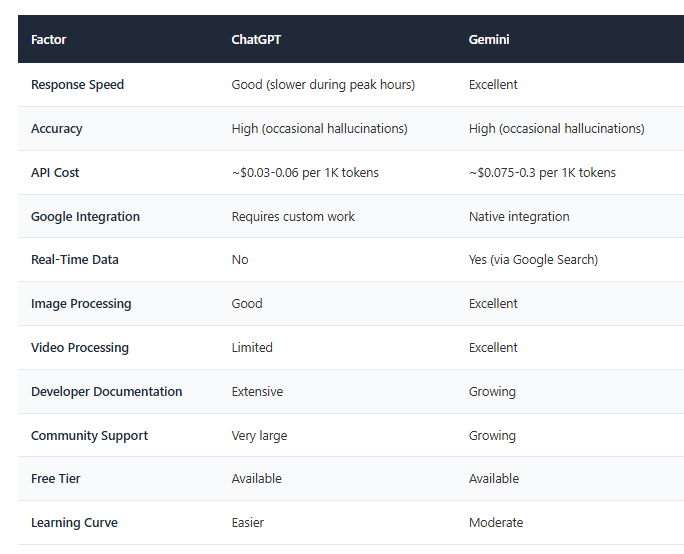
ChatGPT can be slow during peak hours. If millions of people are using it simultaneously, your app’s response time suffers. The free tier experiences the most lag, while paid API access improves performance.
Gemini is generally faster, especially if your app is integrated with Google services. It handles high traffic better because Google has built it on their infrastructure, which is designed to scale quickly.
Winner for mobile: Gemini edges ahead here, but ChatGPT’s paid API is competitive.
Also read Chatbots vs. AI Assistants: Which One is Right for Your Business?
Accuracy and Reliability
Both models are highly accurate, but they make different types of mistakes.
ChatGPT sometimes “hallucinates”, it generates plausible-sounding but false information. This happens less with GPT-4, but it still happens.
Gemini also hallucinates, but it tends to be better at following specific instructions and handling complex multi-step tasks. It’s particularly strong at handling images and video content.
Winner: Tie, but Gemini slightly better for visual content.
Cost Matters
This is often the deciding factor.
ChatGPT’s API costs approximately $0.03 per 1,000 input tokens and $0.06 per 1,000 output tokens. For a high-traffic app, costs can add up quickly. However, the free tier lets you experiment without spending money.
Gemini’s pricing is similar, starting around $0.075 per 1,000 input tokens and $0.3 per 1,000 output tokens for the standard version. Their free tier allows limited requests but is generous for testing.
For budget-conscious developers, both are accessible. For large-scale apps, ChatGPT might be slightly cheaper, but it depends on your usage patterns.
Winner: Roughly equal, depends on your specific use case.
Integration with Existing Tools
If you’re already using Google services—Gmail, Google Drive, Google Analytics, Google Cloud—Gemini integrates seamlessly. This can reduce development time and complexity.
ChatGPT integrates well with most platforms too, but there’s no automatic advantage if you’re in the Google ecosystem. You’ll need custom integrations for Google services.
Winner: Gemini if you use Google tools; ChatGPT if you don’t.
Training Data and Knowledge Cutoff
ChatGPT’s training data extends to April 2024, giving it relatively recent knowledge with the latest API updates potentially including more recent information.
Gemini’s training data is current, and it includes access to real-time information through Google Search, meaning it can fetch live data and current events instantly.
Winner: Gemini for real-time data needs.
Image and Video Processing
ChatGPT (GPT-4 Vision) can process images well, but video handling requires workarounds.
Gemini handles both images and video natively, making it better for apps that involve visual content—whether that’s analyzing photos, videos, or diagrams.
Winner: Gemini for visual-heavy apps.
Developer Experience
ChatGPT has extensive documentation, thousands of tutorials, and a massive developer community. If you get stuck, finding answers is easy. The learning curve is gentler.
Gemini is improving its documentation, but it’s still behind ChatGPT in community resources. You might find fewer Stack Overflow answers or third-party tutorials.
Winner: ChatGPT for ease of implementation.
Safety and Content Moderation
Both models have built-in safety measures to prevent harmful outputs. ChatGPT’s filters are mature and well-tested. Gemini’s safety features are robust but sometimes overly cautious, occasionally refusing requests that should be acceptable.
Winner: Tie, with different trade-offs.
Also read Mobile App Security Audit Checklist: 25 Critical Points Before Launch
Quick Comparison Table
Companies Using These AI Models
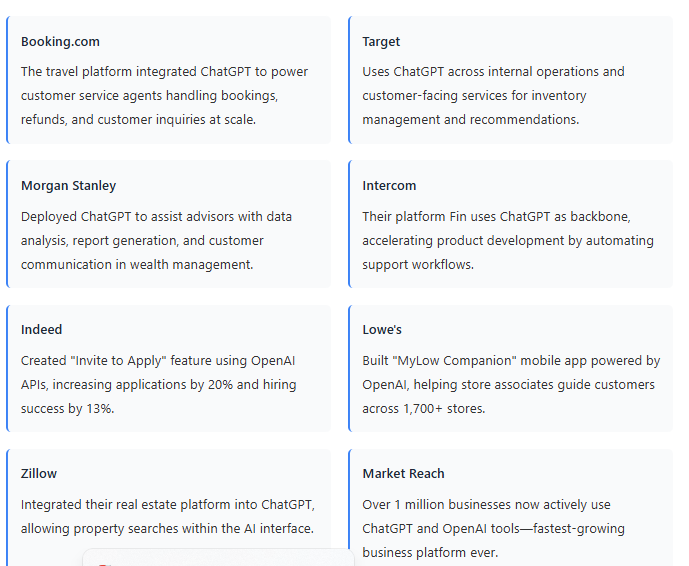
Understanding how real companies deploy these models helps clarify the decision. Here are actual examples from 2025-2026.
Companies Using ChatGPT
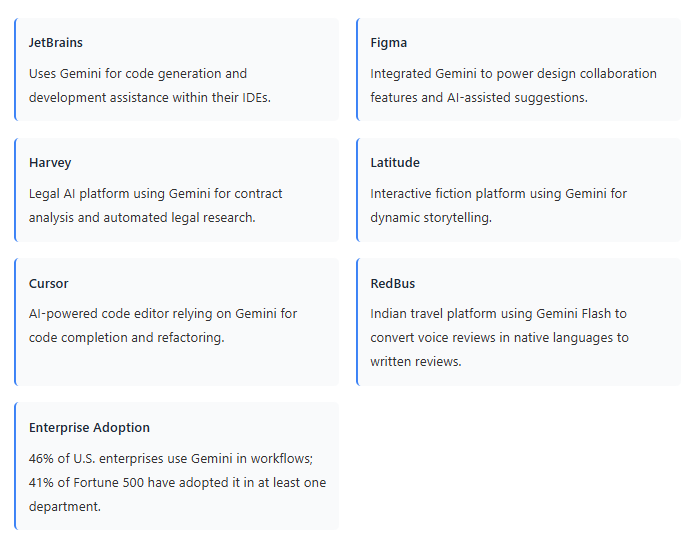
Companies Using Google Gemini
Why Companies Choose Differently
ChatGPT dominates the commercial space because it arrived first and has deep community support. Developers find extensive tutorials and proven patterns for integration.
Gemini attracts companies that need on-device processing for privacy-sensitive work (finance, healthcare, legal) or those already embedded in Google’s ecosystem. Its speed and real-time capabilities also appeal to companies building consumer-facing mobile apps.
Many enterprises are now using both—ChatGPT for content and reasoning, Gemini for speed-critical tasks and on-device processing. This hybrid approach gives flexibility but requires managing two integrations.
So, Which Should You Choose?
Choose Gemini if:
- Your app needs real-time information or current events
- You’re processing images or video
- You’re already using Google Cloud services
- Speed is your top priority
- You want native integration with Google tools
Choose ChatGPT if:
- You need extensive community support and tutorials
- Your team is already familiar with OpenAI’s tools
- You want the most mature, battle-tested solution
- Cost needs to be rock-bottom
- You don’t need real-time data or advanced visual processing
The truth is, both are excellent. The right choice depends on your specific requirements, your team’s expertise, and your app’s unique needs. Many developers are now using both—Gemini for certain tasks and ChatGPT for others. This hybrid approach gives you the best of both worlds, though it adds complexity.
Test both with your actual use case. Set up free accounts, build small prototypes, and measure performance and cost with real data. The few hours you spend testing now will save you months of regret later.
Ready to Integrate AI into Your Mobile App?
Choosing between Gemini and ChatGPT is just the first step. The real challenge is seamless integration, optimization, and ensuring your AI delivers business value from day one.
At Mindster, we specialize in helping developers and businesses integrate cutting-edge AI into their mobile apps. Whether you’re leaning toward ChatGPT for content generation or Gemini for real-time capabilities, our experts have proven experience with both platforms.

Professional content writer Akhila Mathai has over four years of experience. She writes posts about the different mobile app solutions we offer as well as services related to them. Her ability to conduct thorough research and think critically enables her to produce excellent, authentic, and legitimate content. Along with her strong communication abilities, she collaborates well with her teammates to create information that is current and relevant to emerging technology.

